The short answer
Install AnkiDroid. It is free, it has no ads, it has no in-app purchases, and it has been the best flashcard app on Android for over a decade. Nothing on this page beats it for long-term memory.
That recommendation comes with a warning, though: AnkiDroid is not friendly. It looks like it was built by engineers, because it was, and you will spend an evening learning it. If that sounds like a bad trade, skip to the ten easier apps further down.
Three quick answers before the detail:
- Best overall, and free: AnkiDroid
- Best if you want it to just work: Quizlet, $35.99/year for Plus (checked 2026-09-24)
- Best if you hate subscriptions: Flashcards Deluxe, $4.99 once (checked 2026-09-24)
One thing worth knowing before you spend anything. On iPhone, the official Anki app costs $24.99 as a one-off purchase (App Store, checked 2026-09-24). On Android the equivalent app is free. If you are choosing a phone-based study system, Android is the cheap platform, and almost nobody writing about flashcards says so.
Careful: three apps on Google Play trade on the Anki name
This is the part most articles get wrong, so it goes near the top.
Search "anki" on Google Play and you will meet at least three different apps. Only one of them is Anki.
AnkiDroid (com.ichi2.anki, by the AnkiDroid Open Source Team) is the real one. It is free software under the AGPL v3, it syncs with Anki on Windows, macOS and Linux, and it has 10M+ installs and a 4.8 rating from 165,000 reviews.
AlgoApp (com.ankiapp.client, by AlgoApp Inc.) is not Anki. It never was - it was an unrelated commercial app called "AnkiApp" that borrowed the name. As of our check on 24 September 2026 the listing has been renamed to "AlgoApp - Flashcards", so the Anki branding is finally gone from the title. The package id com.ankiapp.client is the giveaway that it is the same app. It does not sync with Anki and never did.
Cardary: Anki Pro (biz.aibase.cardary, by Fuhai Xiao) is a third, unrelated app that still carries "Anki Pro" in its store title.
Why this matters: the most established publisher currently ranking for Android flashcard searches still recommends "AnkiApp Flashcards" to its readers, in an article published in October 2024. That app has since renamed itself. If you follow that advice today you will install something that is not Anki, cannot open your Anki decks, and has nothing to do with the project.
The test that always works: check the developer name and the package id in the Play Store URL. The real one is com.ichi2.anki.
If you want the longer version, we wrote about Anki vs AnkiApp and Anki Pro vs Anki separately.
What a year actually costs
Most app lists quote a price and never say when they checked it, which makes them wrong within months. Every price on this page was checked on 24 September 2026 and says so.
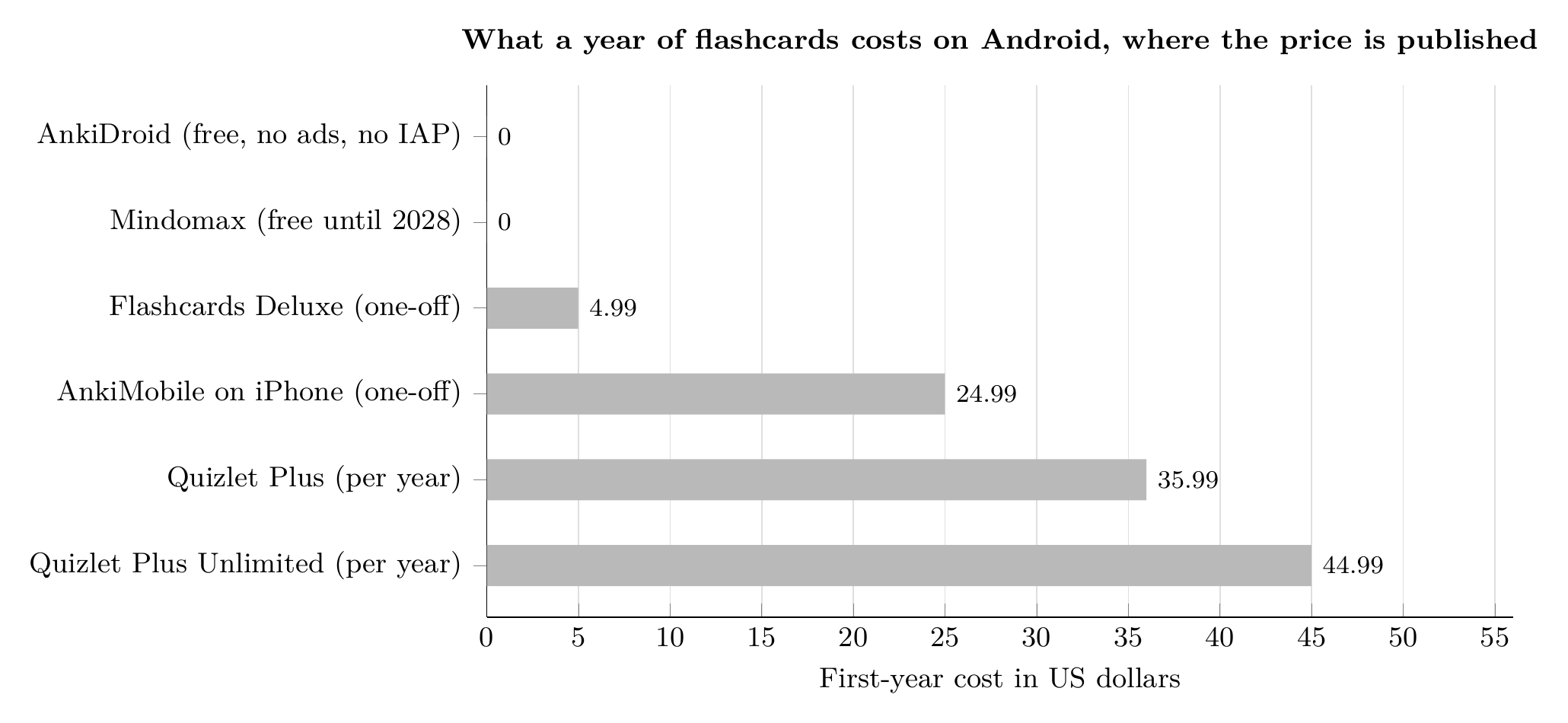
First-year cost of the Android flashcard apps that publish a price. One-off purchases are paid once; subscriptions are the annual billed rate. AnkiMobile is included for contrast - it is the iPhone app, and the Android equivalent, AnkiDroid, is free. Prices checked 2026-09-24. Sources: Google Play, the App Store, quizlet.com/upgrade and mindomax.com/price. Chart by Mindomax.
Two apps on this list publish no price at all. Brainscape's pricing pages show nothing without an account, and Knowt's pricing page returns a 404. Both are marked "not published" below rather than guessed at, because a made-up price is worse than no price.
The 27 apps
Every app above was checked against its live Google Play listing on 24 September 2026. One app we checked did not make it: Memoo (com.loopinteractive.memoo) was last updated in August 2024, over two years ago, and we do not recommend abandonware.
The ones worth more than a table row
1. AnkiDroid - free, and still the best
10M+ installs. 4.8 from 165,000 reviews. No ads, no in-app purchases, no account required.
AnkiDroid runs the same scheduling logic as desktop Anki, which is the most studied spaced-repetition system in consumer software. It syncs with Anki on desktop, it works fully offline, and there are decades of free shared decks for languages, medicine and law.
It is also available on F-Droid (version 2.24.1 at the time of writing), which means you can install it without a Google account at all. No competing article on this subject mentions that, and for anyone on a de-Googled phone it is the whole answer.
The catch: the interface is genuinely dated and the settings are deep. Making cards is manual. Budget an evening.
2. Quizlet - the one your classmates already use
50M+ installs, 4.7 from 916,000 reviews. Quizlet is the easiest way to start, and its library of user-made sets is unmatched.
Quizlet Plus is $2.99/month billed at $35.99/year, and Quizlet Plus Unlimited is $3.75/month billed at $44.99/year (quizlet.com/upgrade, checked 2026-09-24).
The catch: features that used to be free have moved into Plus over the years. The free tier is more limited than its reputation suggests.
3. Flashcards Deluxe - $4.99, once, forever
The only app here you buy outright. $4.99 on Google Play (checked 2026-09-24), no subscription, no ads, no in-app purchases. It supports multiple sides, text-to-speech and Anki-style scheduling.
The catch: it looks like an app from 2014, because its design is from around then. It works.
4. Gizmo - AI cards, at real scale
5M+ installs and a 4.8 rating. Gizmo turns your notes into cards and adds a tutor-style layer on top.
The catch: AI-generated cards are only as good as what you feed them. Vague notes produce vague cards, and you will still edit them.
5. Mindomax - AI cards from PDFs and audio
This is our app, so read this paragraph with that in mind. Mindomax generates flashcards from text, images, PDFs and audio files, runs a spaced-repetition scheduler, and includes a LaTeX editor for maths and science. The free tier gives you one box with unlimited cards. Premium is listed at $0, free until 2028 (mindomax.com/price, checked 2026-09-24).
The catch, honestly: it is the newest and least proven app on this page. The Android listing has 1K+ installs and does not yet have enough ratings to display a score. AnkiDroid has 165,000 reviews and thirteen years of history. If you want something battle-tested, install AnkiDroid instead - that is why it is first on this page.
6. RemNote - notes and flashcards in one place
If you take notes and make cards from them, RemNote merges both. Free tier available; Pro is EUR8/month or EUR96 billed yearly, and Pro with AI is EUR18/month or EUR216 billed yearly (remnote.com/pricing, checked 2026-09-24, shown in euros by the site).
The catch: it is a notes app first. If you only want flashcards, it is more tool than you need.
The small apps nobody writes about
These will not appear on other lists, which is the main reason to read this one. All were verified live on 24 September 2026.
GoCards (pl.gocards) handles Anki-style decks without Anki's complexity. Vocabuo (world.petr.vokabeln) has the highest rating of the small apps at 4.7, though from only 576 ratings. Leitner Box Flashcards (com.floor57.leitnerbox) implements the physical Leitner box method literally, which some people prefer to an opaque algorithm. RecallX (com.spacedrevision.app) and Reviser (com.por7al.reviser) are both new, clean and actively maintained. Recall (app.recall) is about as minimal as a spaced-repetition app gets, with no account and no purchases, though at 100+ installs it is very early.
None of these will replace AnkiDroid for a medical student. All of them are lighter, and for a few hundred cards that can matter more than raw power.
How to choose in thirty seconds
- You want the best system and will spend an evening learning it: AnkiDroid
- You want to start in two minutes: Quizlet
- You refuse to pay a subscription: Flashcards Deluxe, $4.99 once (checked 2026-09-24)
- You have a pile of PDFs and lecture recordings: Gizmo or Mindomax
- You are learning a language: DuoCards or Lexilize
- You want notes and cards together: RemNote
- You are on a phone without Google services: AnkiDroid via F-Droid
Whichever you pick, the app matters far less than whether you open it daily. Spaced repetition works because of the spacing, not the software - we explain why spaced repetition works and how FSRS compares to SM-2 if you want the mechanism.
If the PDF-and-audio route is the one you need, Mindomax is free to install on Android and the premium tier costs nothing until 2028 (checked 2026-09-24).
On other platforms, see our guides to the best flashcard app for PC, flashcard apps for Mac, and iOS flashcard apps. If you study on the train, our guide to the best offline flashcard app covers which of these genuinely work without a connection.
Frequently asked questions
What is the best free flashcard app for Android?
AnkiDroid. It is completely free with no ads and no in-app purchases (Google Play, checked 2026-09-24), and it runs the same scheduling system as desktop Anki. Its only real cost is the time it takes to learn.
Is AnkiDroid the official Anki app for Android?
Yes. AnkiDroid (package com.ichi2.anki, by the AnkiDroid Open Source Team) is the open-source Android client and it syncs with Anki on desktop. Apps called AlgoApp (formerly AnkiApp) and Cardary: Anki Pro are unrelated and do not sync with Anki.
Why is Anki free on Android but $24.99 on iPhone?
AnkiDroid is a community-maintained open-source project released for free. AnkiMobile on iOS is built and sold by Anki's own developer at $24.99 as a one-off purchase (App Store, checked 2026-09-24), and that income funds the project. Both sync with the same account.
Can I use flashcard apps on Android without a Google account?
Yes, with AnkiDroid. It is published on F-Droid (version 2.24.1) as well as Google Play, so it can be installed on a device with no Google services at all.
How much does Quizlet cost on Android?
Quizlet is free to install. Quizlet Plus is $2.99/month billed at $35.99/year, and Quizlet Plus Unlimited is $3.75/month billed at $44.99/year (quizlet.com/upgrade, checked 2026-09-24).
Which Android flashcard apps work offline?
AnkiDroid works fully offline including card creation and review. Flashcards Deluxe also works offline once decks are loaded. Most AI-based apps need a connection to generate cards, even if reviewing works offline afterwards.