
To make good flashcards, first understand the material, then turn each fact into a question that has one short answer, written in your own words. Pick the card format that fits the material: question and answer for facts, cloze (fill in the blank) for sentences and lists, image cards for diagrams. Then choose how to make them: index cards, an app where you type them, or an AI tool that drafts them from your notes for you to edit.
That is the whole method. The rest of this guide shows why each step matters, with numbers from studies that tested how students make cards, a table for picking the right format, a bad card rewritten into good ones, and 13 tools with prices checked on 2026-10-01.
The short version
- Do not make a card for something you do not understand yet. Read and understand first, then write cards.
- One card, one fact. If the answer takes more than a few seconds to say, split the card.
- Write the question and answer in your own words. Typing the textbook sentence word for word gave no benefit in a controlled study.
- Turn lists and long sentences into cloze cards instead of one card with a list on the back.
- Use a picture when the fact is visual, and hide parts of a diagram instead of describing it.
- AI and copy-paste are fine for speed, but read and fix every card. That editing step is where much of the learning happens.
Why making your own flashcards pays off
Many students skip making cards and download a premade deck instead. That saves time, but it costs some learning.
Pan and colleagues (2023) ran six experiments with college students who studied short textbook passages. In one condition, students made their own digital flashcards and then practiced them. In the other, they practiced with premade cards for the same total time. Across the experiments, students remembered more from the cards they made themselves, on both definition questions and questions that asked them to apply the idea. The authors call the gain educationally meaningful.
The surprising part is the cost. Making cards ate a large share of the session, so the students who made their own cards practiced each card fewer times. They still did better. And they did not feel it: their predictions of how well they would do were about the same in both conditions.
How they made the cards mattered too:
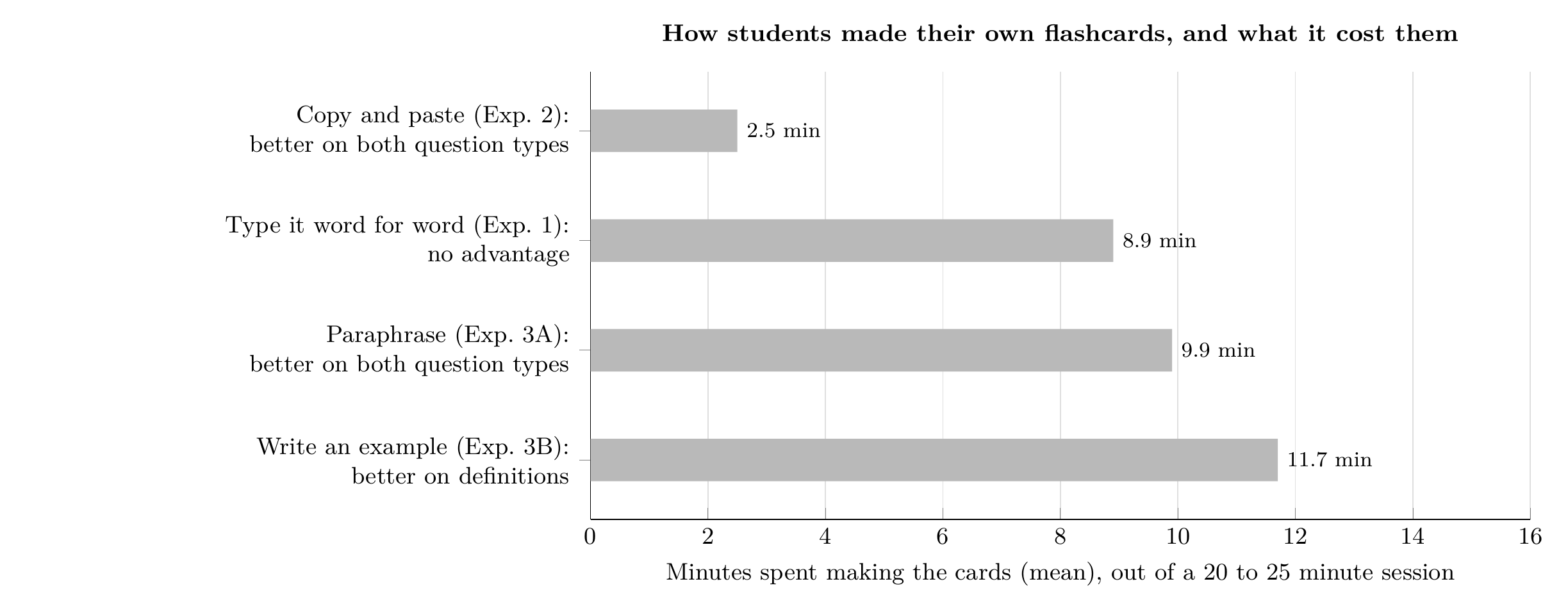
Minutes students spent making their own flashcards in four experiments, and whether those cards beat premade ones on a delayed test. Data from Pan et al. (2023), Table 2 and results. Chart by Mindomax.
Typing the text word for word took almost nine minutes and gave no advantage. Copying and pasting the key sentence took 2.5 minutes and did help. Paraphrasing, putting the definition in your own words, helped on both kinds of question. Writing your own example helped with definitions only.
This fits an older finding called the generation effect: words you produce yourself are remembered better than words you only read (Slamecka and Graf, 1978). The practical lesson is simple. The value of making a card is in the thinking, not the handwriting. If a method lets you skip the copying and keep the thinking, use it.
Step 1: Understand it before you make a card
Piotr Wozniak, who wrote the first spaced repetition software, opened his well-known 20 rules for making flashcards with two rules: do not learn what you do not understand, and learn before you memorize. A card for a sentence you cannot explain only trains you to repeat words.
In practice, read the section once, close the book, and try to explain it in two or three sentences. Make cards only after that, and make them for the parts you would need to remember on an exam.
There is also a warning in the research here. Lin, McDaniel and Miyatsu (2018) found that most flashcards students make, and most that textbooks provide, test small details and definitions. Cards that asked about the main idea or how concepts connect helped weaker readers more than detail cards did. Make some cards that ask "why" and "how", not only "what is".
Step 2: Pick the right card format
Not every fact belongs on a plain front-and-back card. Anki, the most widely used free flashcard program, ships with six built-in card types, and most other apps offer some of the same. Here is which one to use for what:
Cloze cards are underrated. Wozniak calls cloze deletion easy and effective, and it is the best fix for the most common mistake: a card with a list on the back. In Anki, each cloze number in a sentence becomes its own card, so one sentence with three blanks gives you three cards. Image occlusion has been built into Anki since version 23.10, so you no longer need an add-on to hide labels on a diagram.
Step 3: Write each card well
These rules come from Wozniak's 20 rules and the studies above. They work on paper and in any app.
- One fact per card. Wozniak calls this the minimum information principle. Simple cards are easier to remember and quicker to review.
- Ask a question, not a topic. "Photosynthesis" on the front is a topic. "What gas does photosynthesis release?" is a question.
- Use your own words. Paraphrase the definition. In Pan et al., this was one of the methods that helped most.
- Avoid lists and sets. "Name the five stages of mitosis" is hard to remember as one card. Use a cloze card for each stage, in order.
- Add a picture when the fact is visual. "Use imagery" is one of Wozniak's rules. Keep the text short when there is an image.
- Add a context cue when two cards look alike. "(biology) cell" and "(prison) cell" stop the answers from interfering with each other.
- Add your own example. A short example from your life or your lecture makes a dry definition easier to recall.
- Note the source. A page number or lecture date helps you check the card later.
A bad card, rewritten
Here is a card many students would write after reading about memory:
Front: Encoding. Back: Encoding is the input of information into memory. It can be automatic, like remembering what you ate for lunch, or effortful, like learning for a test, which needs attention and work.
It has three facts on the back, and you will half-remember it every time. Split it into four cards:
- What is encoding? (Getting information into memory.)
- Encoding that happens without effort or attention is called [...] processing. (automatic)
- Encoding that needs attention and work is called [...] processing. (effortful)
- Give your own example of effortful processing. (Answer in your own words, then check.)
Four cards take longer to make than one. But each takes two seconds to review and can be answered clearly right or wrong. The last card asks for an example, which is the kind of generating that helped definition recall in Pan et al.
Paper, app or AI: three ways to make them
Paper index cards cost almost nothing and suit small decks, such as one chapter before a quiz. Write the question on one side and the answer on the other, then sort them into boxes by how well you know them. This is the Leitner system. The weak spot is time: every card is written by hand, and keeping track of when to review hundreds of cards gets hard. We compared both options in paper vs digital flashcards.
An app where you type cards is faster to edit, can add audio and images, and schedules reviews for you. Most apps also import a spreadsheet: put questions in column A and answers in column B, save as CSV, and import the file. If you already keep notes in Google Docs, our guide to making flashcards in Google Docs shows that route.
AI tools make cards from your notes, slides or a PDF in seconds. This is the fastest method by far, and it fits the copy-and-paste result from Pan et al.: the cards do not have to be hand-typed to help. But AI cards need checking. Delete cards on things you already know, fix wrong answers, rewrite vague questions in your own words, and split cards that test two facts. That editing is your paraphrasing step. If making cards is the reason you stop studying, read what to do when flashcards take too long to make.
13 tools that make flashcards, compared
Every price below was read from the US App Store or the developer's own pricing page on 2026-10-01. Apps that list several plan tiers are shown with the range they list.
Which to pick depends on how you like to make cards. If you want full control and free software, Anki is still the standard. If you want to type quickly and share sets with a class, Quizlet is the easiest. If most of your material is in PDFs and lecture slides, an AI tool such as Knowt, Gizmo or Mindomax saves the most time, as long as you edit what it makes. If you want to pay once, Flashcards Deluxe costs $4.99 (checked 2026-10-01). For a ranking by study features rather than card making, see our list of the best flashcard apps.
How many flashcards should you make?
Fewer than you think. Each new card comes back for review several times, so the cards you make today become work for weeks. The Anki manual's rule of thumb is that learning 20 new cards a day leads to roughly 200 reviews a day. Make cards for what you need to remember, not for every sentence in the chapter, and add new cards at a pace you can keep up with. Once your cards are made, our guide on how to study with flashcards covers how to review them.
Frequently Asked Questions
What should I put on a flashcard?
One question on the front and one short answer on the back. The answer should take a few seconds to say. If it takes longer, split the card into two or more cards, or turn it into a cloze card.
Is it better to make your own flashcards or use premade ones?
Making your own usually works better. In six experiments by Pan et al. (2023), students remembered more from cards they made themselves than from premade cards, even though making them left less time to practice. Copying the text word for word was the one method that gave no benefit.
Should I make flashcards by hand or on an app?
Paper works well for small decks and for people who remember better by writing. An app is faster to edit and schedules reviews for you, which matters once you have more than a few dozen cards. The way you write the card matters more than the medium.
Are AI-generated flashcards good?
They are a fast first draft. Check every card, delete what you already know, fix errors and rewrite unclear questions in your own words. Pan et al. found that pasting content onto cards still helped, so the speed is not the problem. Skipping the review is.
How many flashcards should I make per chapter?
There is no fixed number. Make one card for each fact or idea you would need on the exam, and keep new cards to a number you can review every day. A common rule from the Anki manual is that 20 new cards a day turns into about 200 reviews a day.
The bottom line
Understand first, write one fact per card in your own words, and pick the format that fits the material. The tool matters less than the editing: paper, Anki and AI cards all work if you read and fix every card before you study it. If you want an app that drafts cards from your notes, PDFs or photos for you to edit, you can try Mindomax for free.
References
Pan, S. C., Zung, I., Imundo, M. N., Zhang, X., and Qiu, Y. (2023). User-generated digital flashcards yield better learning than premade flashcards. Journal of Applied Research in Memory and Cognition, 12(4), 574-588. doi:10.1037/mac0000083
Lin, C., McDaniel, M. A., and Miyatsu, T. (2018). Effects of flashcards on learning authentic materials: The role of detailed versus conceptual flashcards and individual differences in structure-building ability. Journal of Applied Research in Memory and Cognition, 7(4), 529-539. doi:10.1037/h0101829
Slamecka, N. J., and Graf, P. (1978). The generation effect: Delineation of a phenomenon. Journal of Experimental Psychology: Human Learning and Memory, 4(6), 592-604. doi:10.1037/0278-7393.4.6.592
Wozniak, P. (1999). Effective learning: Twenty rules of formulating knowledge. supermemo.com
Anki Manual: Editing and note types. docs.ankiweb.net/editing.html


