
The short answer
Cornell notes turn a notebook page into a quiz. You take notes in a wide column on the right during class, write questions about them in a narrow column on the left afterwards, and sum up the page in two or three sentences at the bottom. Walter Pauk, an education professor at Cornell University, designed the system in the 1950s and published it in his book How to Study in College.
The layout alone does not make it work. Classroom studies of the method are split, and the strongest research behind it is about one step most people skip: covering the right column, answering the questions on the left from memory, and doing it again a few days later.
What are Cornell notes?
A Cornell page has three parts. On a US letter sheet, 8½ by 11 inches, you draw a line 2½ inches from the left edge and another 2 inches up from the bottom. That gives a 2½-inch cue column on the left, a 6-inch note column on the right and a 2-inch summary box across the bottom. These are the measurements on the Cornell Learning Strategies Center's handout, adapted from Pauk's book. Most students also write the course, date and topic at the top.
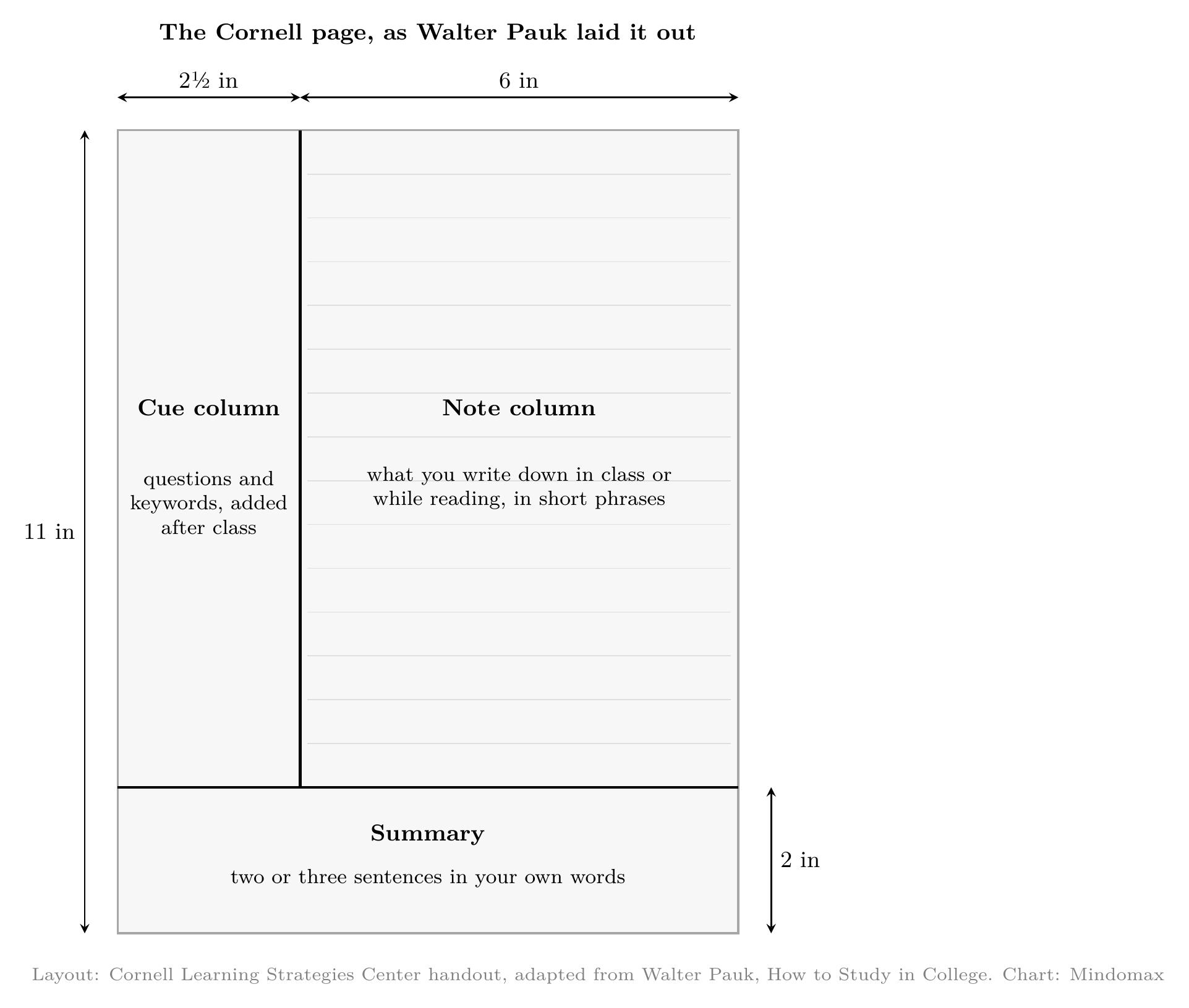
The Cornell page with Pauk's measurements. Layout from the Cornell Learning Strategies Center handout, adapted from Pauk's How to Study in College. Chart by Mindomax.
On a typed page with 1-inch margins you only have 6½ inches of width, so keep the proportions instead of the inches: about 1.9 inches for cues and 4.6 for notes.
How to take Cornell notes, step by step
Cornell's handout lists five steps: Record, Questions, Recite, Reflect and Review. Many study guides, citing an older edition of Pauk's book, call them "the five R's" and name the second step Reduce.
Step 1, Record (during class). Write in the note column only, in short phrases, skipping a line between ideas. Leave the cue column empty.
Step 2, Questions (the same day). Soon after class, write a question in the cue column next to each idea. Write "What do the light reactions produce?" rather than the keyword "light reactions". A question makes you produce the answer later; a keyword only lets you recognize it.
Step 3, Recite. Cover the note column with a sheet of paper, read each question and answer it out loud in your own words. Then uncover the notes and check. Mark every question you got wrong or only half right.
Step 4, Reflect. Ask yourself what the facts mean and how they fit with what you already know, then write the answer in the summary box in two or three sentences. If you cannot, you have found a gap before the exam did.
Step 5, Review. The handout asks for at least ten minutes every week on all your previous notes. Start with the marked questions, and recite instead of rereading.
A filled-in Cornell notes example
One page from an intro biology lecture on photosynthesis, with the questions added the evening after class:
The cue column changes with the subject, but every cue must be answerable with the notes covered.
Do Cornell notes actually work?
The classroom studies are split. Some found better scores after students learned the method; others found no difference, or found that a simpler method helped more.
What students were taught explains some of the split. In the study with no difference, the Cornell class earned points each day for complete notes; the paper says nothing about quizzing themselves with the notes covered.
That fits the wider research. In 2013, a team led by the psychologist John Dunlosky rated ten study techniques by their evidence; only practice testing and spreading study out over time were rated high, while summarizing and rereading were rated low. A Cornell page holds all four: the covered-notes quiz, the return visits, the summary and the glance over the notes. Which ones you do decides what the page is worth.
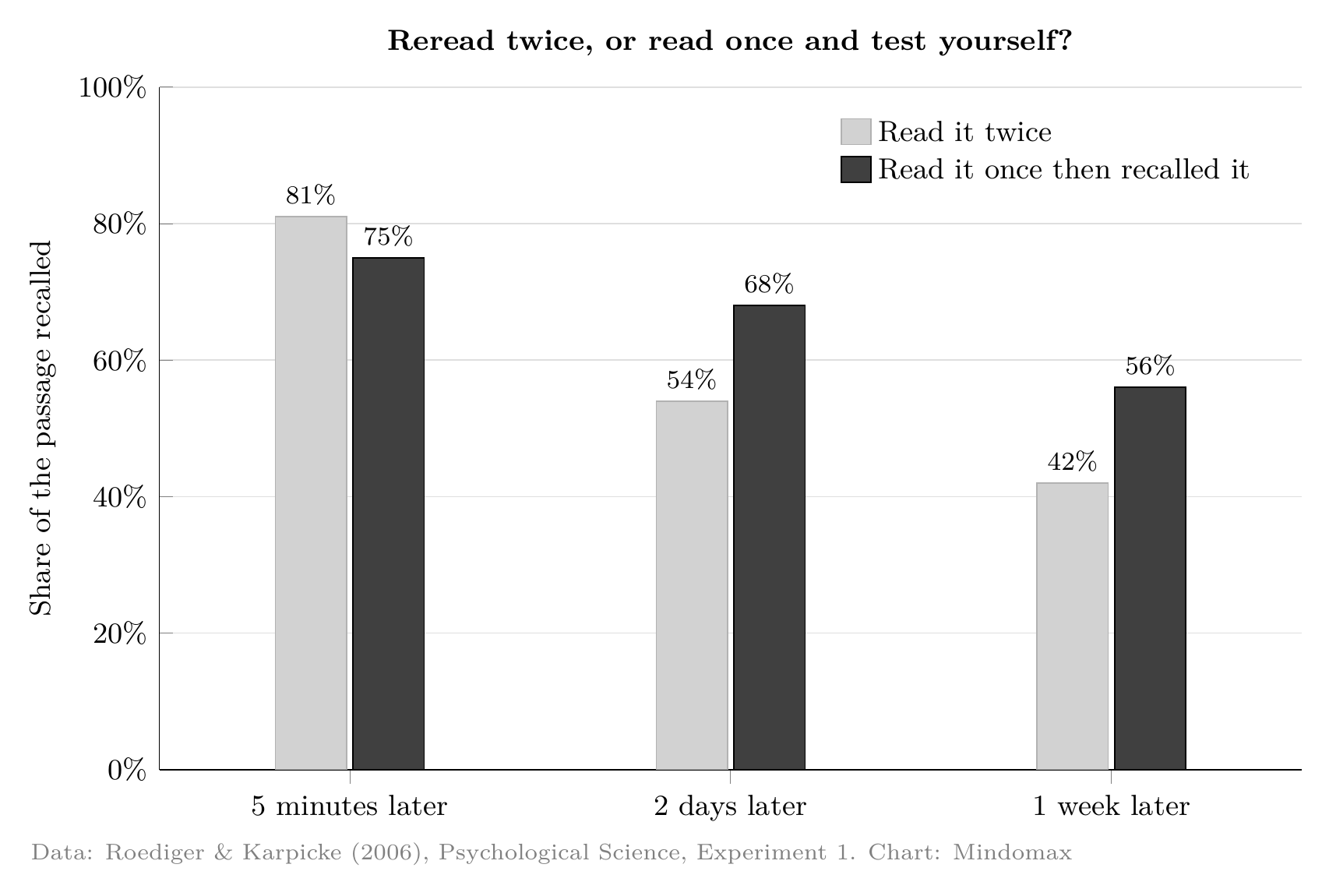
Rereading wins for five minutes; testing yourself wins after that. Share of a prose passage recalled, by delay. Data from Roediger and Karpicke (2006), Psychological Science, Experiment 1. Chart by Mindomax.
The chart shows why reciting feels worse than it is. In Henry Roediger and Jeffrey Karpicke's 2006 experiment with 120 college students, rereading beat self-testing five minutes later. Two days later the order had flipped, and after a week the self-testers remembered 56 percent of the passage against 42 percent. Answering your cue questions with the notes covered is the same move. Our piece on the testing effect explains why it works.
How often to review Cornell notes
The right gap depends on when the test is. In a study of more than 1,350 people, Nicholas Cepeda and colleagues found that the best gap between study sessions grows with the delay before the test, but more slowly: about 20 to 40 percent of the delay for a test one week away, and about 5 to 10 percent for a test a year away. For a quiz next Friday, review again within one to three days. For a final months away, reviews a week or more apart beat rereading every night.
By hand this works for one class; across five it becomes a pile of pages, which is where flashcard apps help. Why gaps beat cramming: the spacing effect.
Paper or laptop?
Cornell's study page says research shows handwriting beats typing. That rests mostly on a 2014 study by Pam Mueller and Daniel Oppenheimer, where students who typed copied the lecture word for word more often and did worse on conceptual questions. It has not held up well. A 2019 replication by Kayla Morehead, John Dunlosky and Katherine Rawson found no consistent difference in test scores, and a 2021 direct replication with 142 students, led by Heather Urry, found typed notes longer and more word for word, but quiz scores no better for the handwriters.
What survives: copying word for word hurts, whatever you write with. Cornell notes push against copying, because you turn your notes into questions afterwards. More in our article on handwriting vs typing for memory.
Cornell notes templates and apps
You do not need an app: a ruler and a pencil are the original method, and Cornell's one-page handout shows the layout. For notes on a screen, these are worth knowing (US prices from the App Store and the makers' pages).
Few people have heard of Penbook or Freenotes. Penbook's free tier is a whole notebook, not a trial. Freenotes is the only one here whose store page names a tool for covering part of your notes, step 3 on a screen; its Android app is rated 3.8, well below the iPad app (checked 2026-10-17).
Turning the cue column into flashcards
The cue column is a stack of flashcards not yet cut out: each question is a front, the answer in your notes is the back. A spaced-repetition app then decides when each question comes back, so hard ones return often. Keep one question per card; our guide on how to make flashcards covers the wording.
Handwritten notes: type the cue questions into Anki or Mindomax, which can also draft cards from a PDF or an image of a page for you to check. Goodnotes or Notability users can try the built-in flashcards first, so each card stays next to its page.
Common mistakes with Cornell notes
Writing keywords instead of questions. "Calvin cycle" lets you glance at the notes and think "I know that". "What does the Calvin cycle make?" does not.
Writing the cues during class. Writing them later is a second pass through the material, while there is still time to ask about what you missed.
Treating the summary as the finish line. In the research on study techniques, summarizing does far less than testing yourself.
Rereading instead of reciting. Rereading makes the page feel familiar, and familiar feels like known. Covering the notes is the only way to find out.
Cornell notes vs other note-taking methods
Cornell is a page layout, so you can outline or draw inside its note column.
If you would rather have the cue questions come back on schedule without managing the pages yourself, Mindomax is free to try.
Sources
Method: the Cornell Learning Strategies Center's note-taking handout and Cornell Note Taking System page; Walter Pauk, How to Study in College (Houghton Mifflin, 2001). Classroom studies: Faber, Morris and Lieberman (2000), Reading Psychology 21(3); Jacobs (2008), Wichita State GRASP Symposium; Quintus and colleagues (2012), Journal of Family and Consumer Sciences Education 30(1); Baharev (2016), Rutgers dissertation; Amhout and colleagues (2023), Pedagogical Research 8(2); Abualzain (2024), Theory and Practice in Language Studies 14(8). Study techniques and memory: Dunlosky and colleagues (2013); Roediger and Karpicke (2006); Cepeda and colleagues (2008). Paper or laptop: Mueller and Oppenheimer (2014); Morehead, Dunlosky and Rawson (2019); Urry and colleagues (2021). Prices: each app's US App Store listing and the makers' own pages, checked 2026-10-17.
Frequently Asked Questions
What are the 5 R's of Cornell notes?
Record, Reduce, Recite, Reflect and Review: record notes during class, reduce them to questions afterwards, recite the answers with the notes covered, reflect on what they mean, and review every week. Cornell's own handout calls the second step Questions.
What goes in the left column of Cornell notes?
Questions about the notes next to them, written after class. Questions work better than keywords, because you use them to quiz yourself with the notes covered.
Are Cornell notes effective?
Classroom studies are mixed: some found better scores after students learned the method, others found no difference. The parts with strong evidence are answering the cue questions from memory and coming back to them over several days.
What are the disadvantages of Cornell notes?
The columns feel cramped for diagrams, and the method takes time after class. The bigger risk is stopping once the page looks finished.
How do I make a Cornell notes template in Google Docs?
Insert a table with two columns and two rows. In Table properties, set the left column to about 1.9 inches and the right to about 4.6, then merge the bottom row's two cells for the summary.


