
The Short Answer
Pick Anki if you want the strongest scheduling for the least money. It is free on Windows, Mac, Linux, Android and the web, and the iPhone app is a one-time $24.99 (checked 2026-09-11). Pick Brainscape if you want a polished app with a large pre-made library and would rather rate a card from 1 to 5 than tune settings. But plan for a subscription: images, sounds and reverse cards are Pro features, and Pro costs $7.99/month on a yearly web plan or $19.99/month if you pay monthly inside the iPhone app (both checked 2026-09-11).
That spread, the same product at two and a half times the monthly rate depending on where you tap "buy", is the detail the other comparisons of these two apps miss. The rest of this page is the evidence: both price sheets, what each free plan leaves out, how the two schedulers decide when you see a card, what happens when you move a deck between them, and which app is still being updated.
Every figure below was read from the vendor's own page, its help centre or the app store listing on 11 September 2026. Where a vendor does not publish a number, we say so rather than guess.
Brainscape vs Anki at a Glance
What Each One Costs
Anki's price fits in one sentence. The desktop program and AnkiWeb are free, AnkiDroid is free with no in-app purchases, and AnkiMobile for iPhone and iPad is a one-time $24.99 in the US App Store (checked 2026-09-11). There is no subscription on any platform. The iPhone price does vary by country: across 39 App Store storefronts we read in the same week it ran from about $22.60 to $38.28 (checked 2026-09-08). The full breakdown is in our guide to whether Anki is free.
Brainscape's price depends on where you buy. Its pricing page lists Basic as free forever and Pro at $7.99/month on a yearly plan, which works out to $95.88 a year (checked 2026-09-11). The page shows no monthly web option. Inside the iPhone app, the App Store listing sells Pro at $19.99 a month, $59.99 every six months, $95.99 a year, or $199.99 for life (checked 2026-09-11). The Android listing says it contains in-app purchases but does not publish the prices, and the Enterprise plan for schools and companies has no public price at all.
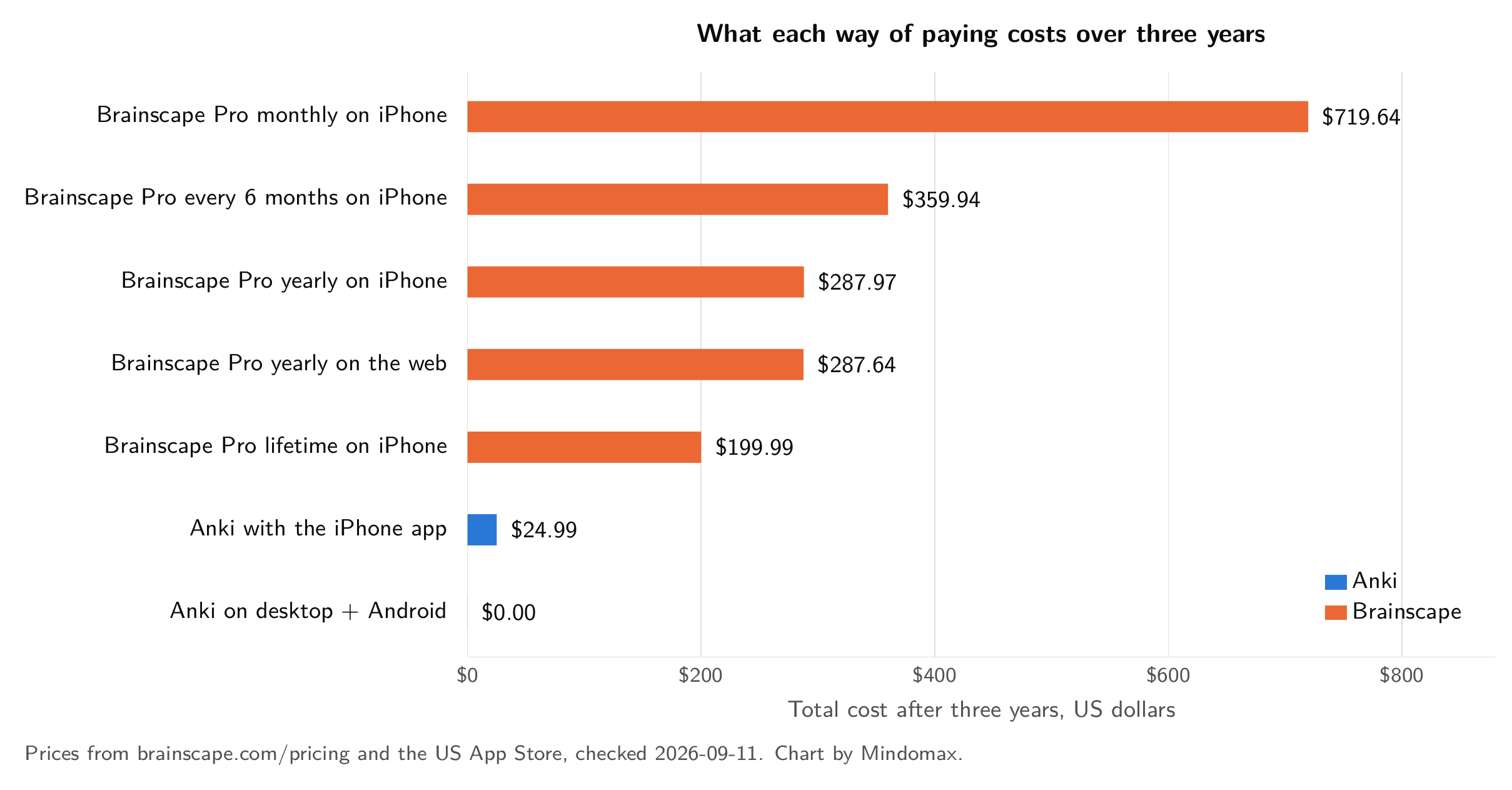
Total cost over three years for each way to use Anki and Brainscape. Prices from brainscape.com/pricing and the US App Store, checked 2026-09-11. Chart by Mindomax.
Three things stand out. First, the yearly plans cost almost exactly the same on the web and in the app, so the real trap is the monthly in-app plan, which costs two and a half times the web rate per month at the prices checked on 2026-09-11. Second, Brainscape's lifetime plan overtakes the yearly plan during the third year: two years of the in-app yearly plan come to $191.98, just under the $199.99 lifetime price (both checked 2026-09-11), so lifetime only pays off if you are sure you will still be using Brainscape in year three. Third, even the cheapest paid route into Brainscape costs more in its first year than Anki costs for as long as you use it.
What the Free Plans Leave Out
Anki's free tier is not a tier. It is the whole program: unlimited decks, images and audio on cards, cloze deletions, built-in image occlusion, add-ons on desktop and free sync through AnkiWeb. The only thing you ever pay for is the convenience of the official iPhone app.
Brainscape's Basic plan is generous where it matters for a first look. According to its pricing page, you can type unlimited flashcards, import existing ones, use AI to make "100s" of cards, share decks, study with spaced repetition, track progress and set reminders. You can also study 2,500 of Brainscape's pre-loaded flashcards and unlimited cards you made yourself or that someone shared with you.
What Basic withholds is more specific, and three items change how people actually study.
Images and sounds on flashcards are Pro only. A language learner who wants audio, or an anatomy student who wants a diagram on the card, needs Pro.
Reverse flashcards are Pro only. Studying a vocabulary deck in both directions is a paid feature.
Private content is Pro only. On Basic, assume the decks you make can be seen by others, and do not put anything in them you would not publish.
Unlimited AI card creation, unlimited Certified (Brainscape's expert-made) decks, bookmarks and resetting your study stats are also on the Pro side of the line.
The Algorithms: FSRS vs Confidence-Based Repetition
Most comparisons of these two apps still describe Anki as running SM-2, the algorithm it has used since the start. That is out of date. Since version 23.10, Anki has shipped FSRS, the Free Spaced Repetition Scheduler, as an alternative to SM-2. The Anki manual describes it as a model that estimates how likely you are to forget each card, so you can remember more in the same study time. You choose a desired retention, for example 90 percent, and FSRS schedules each card for the moment its predicted recall drops to that level. It works in Anki 23.10 and later, AnkiMobile 23.10, AnkiWeb and AnkiDroid 2.17 and later. FSRS can also fit its parameters to your own review history, which is something no fixed formula does. We compared the two schedulers in detail in FSRS vs SM-2.
Brainscape uses what it calls Confidence-Based Repetition. After you reveal an answer, you rate your confidence from 1 (not at all) to 5 (totally confident), and cards you rate low come back sooner than cards you rate high. It is quick to learn and it feels natural, because you are answering a question you can actually answer ("how sure was I?") rather than choosing between Anki's four buttons.
What neither vendor gives you is a head-to-head test. FSRS is open source and its authors publish benchmarks against other open algorithms. Brainscape has not published a benchmark of Confidence-Based Repetition against SM-2 or FSRS, and we could not find an independent one. So the honest summary is: Anki's scheduler is more transparent and more tunable, Brainscape's is simpler, and nobody has measured which one leaves you remembering more.
For most learners the bigger factor is not the algorithm. It is whether you open the app every day. Pick the one you will actually use.
Making Cards and Finding Decks
Anki is built for people who make their own cards. Note types let one entry produce several cards, cloze deletions turn a sentence into fill-in-the-blank cards, and the desktop add-on ecosystem covers almost any workflow. The cost is time and a learning curve. Anki has no built-in AI card generator, and its interface has not changed much in years. If you would rather not build decks, AnkiWeb hosts a large library of free shared decks, although quality varies from deck to deck.
Brainscape is built for people who want to start studying quickly. Its editor is cleaner, its Bulk AI Import turns pasted text or a file into cards, and its Certified decks cover entrance exams, languages, medicine and nursing, and professional certifications. On Basic you can study up to 2,500 of those pre-loaded cards. Past that, the library is a Pro feature.
Switching Between Them
Brainscape's help centre is direct about it: there is no direct import from Anki. The route it describes is to export your cards from Anki as plain text, then bring that .txt file in through Brainscape's Bulk AI Import on the web or in the app, or to paste the text into the Import or Make Flashcards window.
Two consequences follow, and neither is mentioned on that help page. A plain-text export carries the words on your cards, not your review history, so every card starts over as new and the months of spacing you have built up stay behind in Anki. And media does not travel in a text file, so image and audio cards arrive without their images and audio, which you could only add back on Pro anyway.
Going the other way, Brainscape does not document an export to Anki. People who make that move use third-party converters, so check what a converter carries before you rely on it.
The practical advice is the same in both directions: do not migrate a large, mature deck in the middle of exam preparation. Start new material in the new app and let the old deck finish in the old one.
Who Is Still Updating What
All read from the US App Store, Google Play and the Anki release page on 2026-09-11. The pattern is clear. Anki's desktop program is actively developed, with 26.08.1 released in August 2026, and AnkiDroid was updated in May. But AnkiMobile, the only part of Anki that costs money, had its last update on 2025-09-08, 368 days before we checked, and it carries the lowest rating in this table. Brainscape had shipped an iPhone update nine days before we looked, and its iPhone rating is the highest here by a wide margin.
None of that makes AnkiMobile broken. It still syncs with the desktop program and supports FSRS. But if you study mainly on an iPhone, this is the one place where Brainscape is clearly ahead.
Who Should Pick Which
Choose Anki if you want to pay nothing, or $24.99 once for the iPhone app (checked 2026-09-11). It is also the better pick if you study on Android, where AnkiDroid is free and very widely used; if you want images, audio and reverse cards without a subscription; if you want to tune the scheduler yourself or let FSRS fit itself to your history; and if you plan to study the same material for years, as in medicine or a language.
Choose Brainscape if you want a clean app that works well from the first minute, and you would rather use a pre-made, expert-built deck than build your own. It also suits teachers sharing decks with a class, and anyone who does not want to think about settings at all. Just buy Pro on the web or yearly, not monthly in the app.
Many learners who compare the two end up with Anki for their long-running decks and try Brainscape for one specific exam. That works fine. Just do not expect your review history to move between them.
If Neither Fits
If you tried both and neither felt right, three other apps solve different problems. Prices were checked on 2026-09-11.
RemNote puts notes and flashcards in the same place: you write notes, and parts of them become cards. It suits students who want one app for a whole course. Free covers unlimited notes; Pro is $8/month billed $96 yearly and Pro with AI is $18/month billed $216 yearly (checked 2026-09-11), per its pricing page. The limitation: the free plan stops at 3 annotated PDFs and 5 image-occlusion cards. We compared it with Anki in RemNote vs Anki.
Mindomax is our own app, so weigh this entry accordingly. It uses AI to turn PDFs, lecture audio and photos of notes into flashcards, reads cards aloud in 14 languages, and runs on iPhone, Android and the web. The free plan gives you one box with unlimited cards, and the pricing page lists Premium at $0, free until 2028 (checked 2026-09-11). The limitations are real: it is a young app, with a "1K+ downloads" badge on Google Play and no US App Store ratings yet; it cannot import Anki's .apkg files, so an Anki deck does not arrive with its history; and there is no published benchmark of its scheduler.
Mochi is a small, fast app for people who like to write cards in Markdown. It works offline, and the free plan includes unlimited cards, decks, import and export. Pro is $5/month billed annually and adds sync across devices (checked 2026-09-11), per its pricing page. The limitation: syncing between your phone and computer is the paid part, and its community and shared-deck library are much smaller than Anki's or Brainscape's.
For a wider list, our best flashcard apps guide compares 31 apps with dated prices.
If you would like to see how AI-made cards feel next to your Anki or Brainscape decks, Mindomax is free to try.
Frequently Asked Questions
Is Brainscape better than Anki?
Neither is better for everyone. Anki is better if you want the most control, free images and audio, and a scheduler you can tune, including FSRS. Brainscape is better if you want a polished app and pre-made expert decks, and you do not mind a subscription for features like images and reverse cards.
Is Brainscape free?
Brainscape Basic is free forever. It lets you make unlimited text cards, use spaced repetition and study 2,500 pre-loaded cards. Images, sounds, reverse cards and private decks need Pro, which is $7.99/month on a yearly web plan or $19.99/month in the iPhone app (checked 2026-09-11).
Is Anki free in 2026?
Yes, on every platform except iPhone and iPad. Anki for Windows, Mac and Linux, AnkiWeb and AnkiDroid for Android are free. AnkiMobile for iPhone and iPad is a one-time $24.99 in the US App Store (checked 2026-09-11), with no subscription.
Can I import my Anki decks into Brainscape?
Not directly. Brainscape's help centre says to export your Anki cards as a plain-text file and import it with Brainscape's Bulk AI Import. Your review history and your images and audio do not come with it, so every card starts over as new.
Does Brainscape use spaced repetition?
Yes. Brainscape uses Confidence-Based Repetition: you rate each card from 1 to 5, and cards you are less sure of come back sooner. Brainscape has not published a benchmark comparing it with Anki's FSRS or SM-2.
Why is Brainscape more expensive in the iPhone app?
The yearly plans cost about the same: $7.99/month billed yearly on the web and $95.99/year in the app (checked 2026-09-11). The difference is the monthly in-app plan at $19.99/month (checked 2026-09-11), which the website does not offer. If you want Pro, compare the yearly options before subscribing monthly in the app.
Which is better for medical school, Anki or Brainscape?
Most medical students who plan to study the same material for years choose Anki, because images, audio and FSRS are free and large shared decks exist. Brainscape's Certified medical and nursing decks are a quicker start, but full access to them requires Pro.


