
Most lists of the best Anki add-ons were written for an Anki that no longer exists. They still tell you to install Image Occlusion Enhanced, Frozen Fields and Night Mode. Anki now has the first built in, and the current version refuses to run the other two.
The short answer: most people need four or five add-ons, not forty. Start with FSRS Helper, Edit Field During Review and HyperTTS, add Review Hotmouse or Advanced Review Bottom Bar if reviews feel slow, and pick one motivation add-on if you need it. Everything below was checked against Anki 26.09.2, released on 15 September 2026.
How We Checked Every Add-on
Every add-on figure in this article comes from AnkiWeb itself, read on 2026-09-22. For each add-on we took its thumbs-up count, its last update date and the range of Anki versions its author supports.
An add-on made this list only if it passed two tests. It was updated in the last 12 months, and Anki 26.09 does not block it. When an author sets a hard upper limit, Anki's add-on manager refuses to run the add-on on any later version. You can see the rule in Anki's source code. The official Anki manual is blunt about it too: updating Anki can break older add-ons, and you may have to stay on an older Anki until the author catches up.
So we measured how big that problem is. We took the 100 add-ons with the most thumbs-up on AnkiWeb. 42 of them were last updated before Anki 23.10 came out in October 2023. 13 of them are hard-capped at an old version, which means Anki 26.09 will not run them at all.
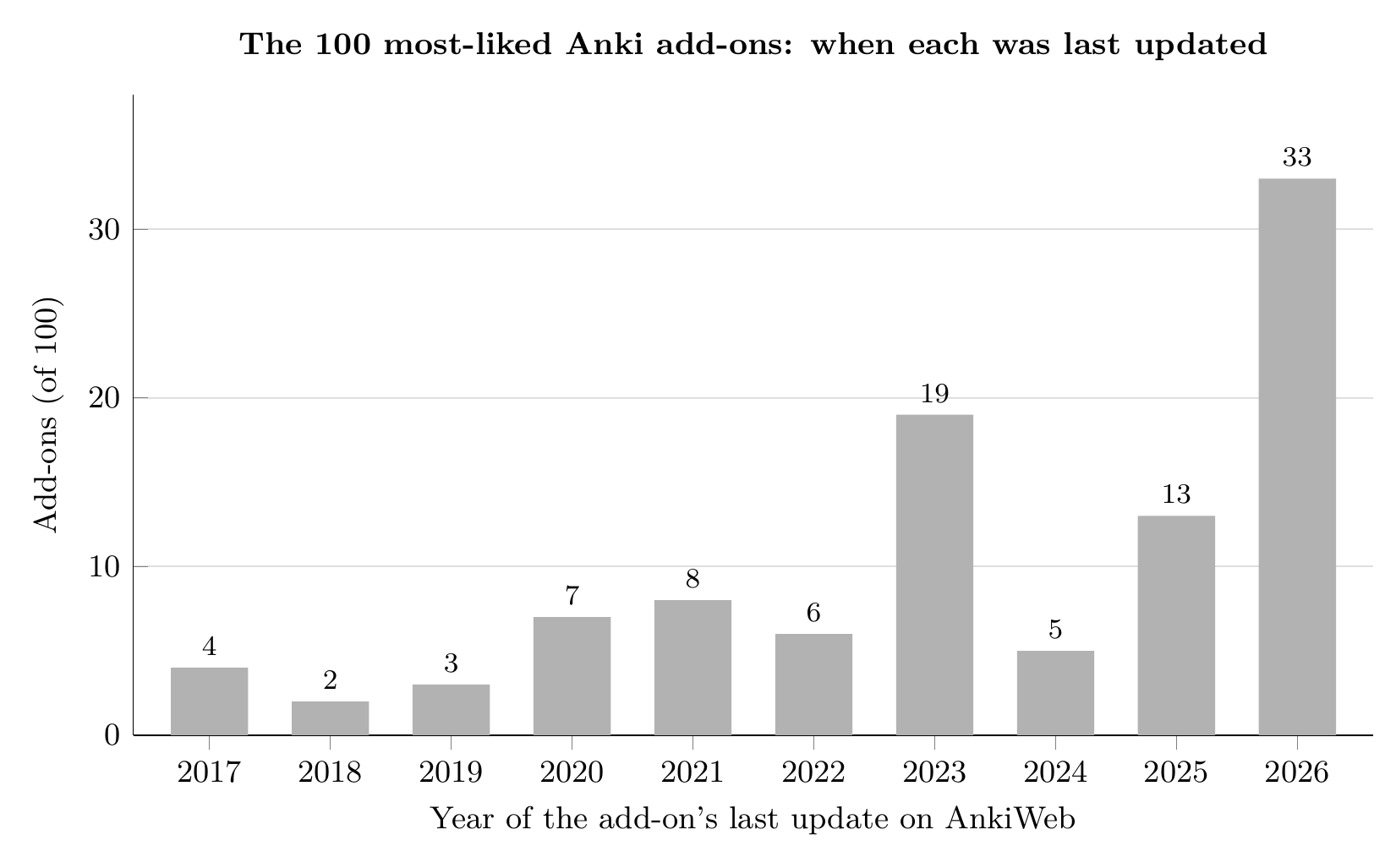
42 of the 100 most-liked add-ons were last updated before Anki 23.10.
Data: AnkiWeb add-on directory, read 2026-09-22. Chart by Mindomax.
The "Versions" line in each entry shows AnkiWeb's own range. A range ending in "+" means the author tested it up to that version and lets it run on newer ones. The "Code" is what you paste into Anki to install it.
The 25 Add-ons at a Glance
1. FSRS Helper - Postpone, Advance and Plan a Break
FSRS is built into Anki now, but FSRS Helper still does jobs Anki does not. It can postpone a pile of due cards after a bad week, advance cards before an exam, schedule a break before a holiday, and spread out sibling cards from the same note. Code 759844606. Versions: 24.11+. Limitation: it only helps if FSRS is switched on. Its load balancing and easy days are now built into Anki, so ignore those parts. If you are unsure whether to switch, read our FSRS vs SM-2 comparison first.
2. Edit Field During Review - Fix a Typo Without Leaving the Card
Normally a typo means opening the editor and losing your place. Edit Field During Review lets you click the text and fix it on the spot. Code 1020366288. Versions: 25.09+. Limitation: nothing happens until you edit your card template and change {{Field}} to {{edit:Field}}. The author also calls it very simple, and it is.
3. HyperTTS - Audio for Any Card
HyperTTS comes from the maintainer of AwesomeTTS and adds spoken audio to your cards, one at a time or in bulk. Free sources include Google Translate, Naver Papago, Collins, Oxford, Duden and the Windows voices. Code 111623432. Versions: 2.1.5 to 25.09+. Limitation: the best voices (Azure, Amazon Polly, ElevenLabs) need your own API key or HyperTTS Pro at $5 per month for 250,000 characters (checked 2026-09-22).
4. Advanced Review Bottom Bar - Better Answer Buttons
Advanced Review Bottom Bar lets you resize, recolor, relabel and reorder the buttons under each card, and adds a sidebar to the review screen. Bigger, clearly colored Again and Good buttons make misclicks less likely. Code 1136455830. Versions: 23.10 to 25.09.2+. Limitation: its author warns it conflicts with Speed Focus Mode, and its last update was October 2025.
5. Review Hotmouse - Review With the Mouse Wheel
Review Hotmouse lets you review with one hand on the mouse. Scroll down shows the answer and then presses Good, scroll up presses Again, and a right click undoes. More than 20 actions can be mapped. Code 1928346827. Versions: 2.1.28 to 26.08.1+. Limitation: an accidental scroll now answers a card, so the first day feels twitchy.
6. See Previous Card Ratings in Reviewer - Spot Problem Cards
This add-on shows a card's past ratings right in the reviewer, and hovering shows when each review happened. A card with five Agains in a row is usually badly written rather than hard. Rewrite it, or bury or suspend it. Code 1906641654. Versions: 2.1.20 to 24.11+. Limitation: the author has only tested it up to 24.11.
7. Enhanced Cloze - Cloze Cards With Context
Enhanced Cloze changes how cloze cards are shown. The blank you are being tested on is red, and the other blanks on the same note stay hidden or show their hints. Code 1990296174. Versions: 2.1.28 to 25.09.2+. Limitation: it only works with its own note type, "Enhanced Cloze 2.1 v2", so existing cloze notes have to be converted.
8. Symbols As You Type - Arrows, Math and Accents
Type a short key sequence and Symbols As You Type swaps in the real symbol, such as an arrow or a Greek letter. You can build your own list, and it syncs with your profile. Code 2040501954. Versions: 2.1.0 to 25.09.2+. Limitation: it does not work in the card browser's search bar, and it clashes with the Multi-Column Note Editor add-on.
9. Anki Note Linker - Link Related Notes
Anki Note Linker lets you link one note to another inside a card, so a drug card can point to its mechanism card. Code 1077002392. Versions: 2.1.56 to 26.08.1+. Limitation: its author says that without the add-on the links do not display properly. That matters on your phone, where add-ons cannot run.
10. Batch Download Pictures From Google Images - Images for Vocabulary Decks
Select a batch of vocabulary notes, run this add-on, and each note gets an image from Google Images. A picture gives a vocabulary card a second hook. Code 561924305. Versions: 25.02 to 25.09.2+. Limitation: it has 30 thumbs-down against 134 up, the worst ratio of any add-on here. Check the pictures it picks before you study them.
11. AnkiDraw - Write Answers With a Stylus
AnkiDraw adds a drawing layer with pen pressure and line smoothing. Write kanji, sketch a diagram or work a math step before flipping. Code 1868980340. Versions: 2.1.50 to 24.11+. Limitation: it is only tested up to 24.11, and it is slow with a mouse; use a pen or touchscreen.
12. Google Translate - Fill Translation Fields in Bulk
Google Translate fills a translation field for one note or many, and can add romanization, definitions and examples. Code 1536291224. Versions: 25.09.1 to 25.09.5+. Limitation: the author says it relies on an outdated Google Translate API and pauses for 30 seconds every so often, so big batches are slow.
13. Watch Foreign Language Movies with Anki - Sentence Cards From Films
Give this add-on a video or audio file with subtitles, and it splits it into short phrases, one card each, with the clip attached. It works like subs2srs, but inside Anki. Code 939347702. Versions: 25.09.4+. Limitation: you need the video and a matching subtitle file yourself, and badly timed subtitles make badly cut clips.
14. AJT Japanese - Furigana, Pitch Accent and Pronunciation
AJT Japanese adds furigana readings, looks up pitch accent and attaches native pronunciations, for one note or thousands at once. Code 1344485230. Versions: builds for each Anki release up to 26.08.9+. Limitation: you have to tell it which fields hold the word, the reading and the pitch. Each Anki version gets its own build, so update it whenever you update Anki.
15. Kanji Colorizer - Stroke-Order Diagrams
Kanji Colorizer adds a colored stroke-order diagram whenever you fill in a kanji field. The diagrams are saved as media, so they also show up on your phone and on AnkiWeb. Code 1964372878. Versions: 2.1.0 to 23.12.1+. Limitation: the download is over 50 MB and seems to freeze. The author's advice is to wait.
16. Chinese Support 3 - Pinyin, Tones and Meanings
Chinese Support 3 revives the old Chinese Support add-on, filling in pinyin, tone colors and meanings as you type. Code 1752008591. Versions: 25.02+. Limitation: the author says it is still in beta and sometimes ships in an unstable state, so update it often and keep a backup.
17. Copycat Importer - Move Your Decks From AlgoApp or Noji
Copycat Importer brings cards from AlgoApp or Noji into Anki; its forum thread still uses their old names, AnkiApp and AnkiPro. Code 2072125761. Versions: 2.1.50 to 25.07.5+. Limitation: it is only tested up to 25.07.5. Check a few imported cards before you delete anything in the old app.
18. AnkiCollab - Build Decks With Classmates
AnkiCollab is a free, open-source way to split deck-building across a group, with suggested changes flowing to every subscriber. Code 1957538407. Versions: 2.1.50 to 26.09+. Limitation: the author warns it is still in development, that bugs can break things and even lose data, and says to back up your collection first.
19. AnkiConnect - Connect Outside Tools
AnkiConnect does nothing you can see. It opens a local connection that other tools, such as Yomitan, use to create cards in Anki. Code 2055492159. Versions: 2.1.45+. Limitation: only install it if a tool you use asks for it. With nothing connected, it is just an open port.
20. Anki Leaderboard - Compete With Friends
Anki Leaderboard ranks users by the number of cards reviewed today, with countries and leagues. It revives the original, which was shut down. Code 175794613. Versions: 2.1.1 to 26.09+. Limitation: your review count becomes public under your username. Extras are behind the author's Patreon at $5 per month (checked 2026-09-22).
21. Life Drain - A Life Bar for Focus
Life Drain adds a bar that drains while you think, and each answer refills it. Code 715575551. Versions: 2.1.55 to 25.09.4+. Limitation: it rewards speed, and some hard cards deserve slow thought. Turn it off for decks where you need to reason.
22. Pomodium - A Pomodoro Timer Inside Anki
Pomodium puts a Pomodoro timer in the corner of Anki for timed sessions and breaks. Code 678094152. Versions: 24.06.1 to 25.02.7+. Limitation: pinning the timer outside Anki is for the Pro version only, and its AnkiWeb page gives no price.
23. Ankimon - Turn Reviews Into a Game
Ankimon lets you catch, train and battle Pokemon as you review. With 2,229 thumbs-up it is the second most-liked add-on on all of AnkiWeb. Code 1908235722. Versions: 23.10 to 25.02.5+. Limitation: it is a game on top of your reviews. For some people that makes studying fun, and for others it becomes the thing they open Anki for.
24. SynapsePro - A New Look Plus AI Tools
SynapsePro is a German medical student's attempt to replace a pile of add-ons with one modern workspace. It adds AI explanations using your own key from OpenAI, Gemini, Claude or OpenRouter, or a free local model through Ollama. It is non-profit. Code 236979321. Versions: 25.09.4 to 26.05+. Limitation: it needs Anki 25.09.4 or newer and is a download of more than 30 MB. It changes so much that problems are hard to trace.
25. AnkiBrain - AI Cards From Your Own Notes
AnkiBrain brings a ChatGPT-style assistant into Anki. It explains cards and generates new ones from notes you import. Code 1915225457. Versions: 2.1.50 to 26.08.1+. Limitation: Local Mode uses your own OpenAI key, so you pay OpenAI for what you use. AI-written cards still need checking before you study them.
Famous Add-ons You Can Skip in 2026
These are the add-ons older lists recommend most, and what Anki 26.09 does with them today, from AnkiWeb and Anki's release notes.
A few old favorites are not blocked and still install: Advanced Browser, Batch Editing, Customize Keyboard Shortcuts and Mini Format Pack. None has been updated in almost two years or more, so if one misbehaves after an Anki update, suspect it first.
How to Install an Add-on, and Fix One That Breaks
In Anki on your computer, open Tools, then Add-ons, then Get Add-ons. Paste the code and restart Anki.
When Anki acts strangely after an update, the Anki troubleshooting guide gives the fix. Hold Shift while Anki starts to open it in safe mode, with every add-on switched off. If the problem goes away, turn half your add-ons back on, then half of the rest, until you find the one causing it.
One limit catches a lot of people: add-ons only run on the desktop app. The AnkiDroid FAQ explains that neither Android nor iOS lets an app download and run extra code. So no add-on works in AnkiDroid or in AnkiMobile, the paid iPhone app that our guide to Anki's price covers. Your cards sync to your phone, but the add-ons do not.
When Add-ons Are Not the Answer
Add-ons only run on a computer, a new Anki release can break them, and every extra one is more to maintain. If what you mostly want is AI-made cards and audio that also work on your phone, a separate app can be less work than five add-ons. Our list of Anki alternatives with AI compares them.
Mindomax is one of them. It is our own app, so weigh this paragraph with that in mind. It makes flashcards from PDFs, text, images and audio, reads cards aloud in 14 languages, and runs on iPhone, Android, Mac and the web. The Free plan is $0, and Premium is listed at $0 until 2028 (checked 2026-09-22). Limitation: it has no add-on system and no documented way to import an Anki deck, and its scheduler is its own design and has not been independently tested. If add-ons are why you love Anki, stay with Anki.
If you want to try the other route, you can start with Mindomax for free and keep Anki installed while you compare.
Frequently Asked Questions
What are the best Anki add-ons for beginners?
Start small: FSRS Helper, Edit Field During Review and HyperTTS cover scheduling, fixing mistakes and audio. Every extra add-on is one more thing that can break when Anki updates.
Do Anki add-ons work on AnkiMobile or AnkiDroid?
No. Add-ons only run in the desktop app on Windows, Mac and Linux. The AnkiDroid FAQ explains that Android and iOS do not let apps download and run extra code. Some add-ons, like Kanji Colorizer, save their results as media, and those results do show up on your phone.
Is Image Occlusion still an add-on?
No. Anki has had Image Occlusion built in since version 23.10, released in October 2023. The old Image Occlusion Enhanced add-on was last updated in April 2022. Use the built-in note type instead.
Why did my Anki add-ons stop working after an update?
New Anki releases change code that add-ons rely on, and if an author set a maximum version, Anki refuses to run the add-on on anything newer. Hold Shift while starting Anki for safe mode, then switch add-ons back on in halves to find the culprit.
Are Anki add-ons safe?
Add-ons are code that runs inside Anki with full access to your collection. Install them from AnkiWeb, prefer recently updated ones with plenty of ratings, and back up before trying anything that changes many cards.
Are Anki add-ons free?
Almost all of them are. The costs come from services some add-ons connect to: HyperTTS Pro voices at $5 per month (checked 2026-09-22), AI add-ons that use your own OpenAI or Gemini key, and extras behind some authors' Patreon pages.


