
The Short Answer
If you want to leave Anki but keep your decks and a modern scheduler, look at Space, Mochi or Flashcards World first. All three run FSRS and import Anki's .apkg files. If you want your notes and flashcards in one place, look at RemNote. If you want the app to write the cards for you, jump to the AI section. And if you study one language, a specialist app like Pleco, Bunpro or Clozemaster will usually beat any general flashcard app.
This list has 27 apps. Every store listing was checked on 2026-09-13, every price carries that date, and apps not updated in more than a year were left out. Most of them do not appear on the other "best Anki alternatives" lists, which are mostly written by flashcard companies that put their own app first.
All 27 Apps at a Glance
What You Give Up When You Leave Anki
Less than you might think. Anki is free on the desktop, on AnkiWeb and on Android through AnkiDroid, according to its official site. Only the iPhone app, AnkiMobile, costs money: $24.99 once on the US App Store (checked 2026-09-13). Our guide to whether Anki is free has the details.
Anki also runs FSRS, the modern scheduler most apps on this list advertise. Anki's manual says it works in Anki 23.10, AnkiMobile 23.10, AnkiWeb and AnkiDroid 2.17 or later, but you have to switch it on in the deck options, so many long-time users still review with the older SM-2. Our FSRS vs SM-2 explainer shows the difference.
So people leave for the setup, the dated look, typing every card by hand, and an iPhone app last updated on 2025-09-08. Two questions then decide which alternative fits: does it import your .apkg decks, and which scheduler does it use? The table answers both.
One naming trap: AnkiApp and Anki Pro are not made by Anki's developers. Anki's own FAQ notes that AnkiApp is now AlgoApp and Anki Pro is now Noji.
Keep Your Decks: 9 Apps That Import Anki Files
1. RemNote turns the notes you write into flashcards, so notes and reviews live in one app. It offers FSRS, imports Anki decks and runs on every major platform. Price: free; Pro $8 a month or $96 a year, Pro with AI $18 a month (checked 2026-09-13). Weak spot: the free plan caps annotated PDFs at 3, image-occlusion cards at 5 and AI at 250 credits a month. More in our RemNote vs Anki comparison.
2. Space is the closest thing to a redesigned Anki. Its free plan includes FSRS-6, cloud sync and imports from Anki, CSV, Excel and Google Sheets, on iOS, Android, macOS, Windows and Linux. Price: free; Pro €5.99 a month or €49.99 a year (checked 2026-09-13). Weak spot: AI is Pro-only, and prices are shown in euros only.
3. Mochi keeps cards in Markdown and imports .apkg files with their review history, so your intervals survive the move. It uses FSRS on Mac, Windows, Linux, iOS, Android and the web. Price: free with unlimited cards offline; Pro $5 a month billed yearly adds sync, AI and 10 GB of storage (checked 2026-09-13). Weak spot: without Pro, nothing syncs between your devices.
4. Flashcards World has the most generous free plan here: unlimited cards, more than 100,000 ready-made sets, sync and no ads. It uses FSRS aimed at 90 percent retention and keeps Anki's scheduling state on import. Price: free; premium adds AI cards and HD voice, but its price is not listed on the website (checked 2026-09-13). Weak spot: you cannot see the premium price before signing up.
5. Discito is a new iPhone and iPad app built on FSRS-6. It imports .apkg decks with their images, audio and FSRS state, and syncs through iCloud. Price: free up to 200 cards; Pro $14.99 once, with no subscription (checked 2026-09-13). Weak spot: Apple only, and it needs iOS 26.
6. Avorio is for studying offline and in private on a Mac. It imports .apkg and .colpkg files with intervals, ease, lapses and review history intact, fits FSRS-5 to your own history and exports back to .apkg. Price: core features free; paid plans from $3.99 a month add cloud AI and Mac-to-iPhone sync (checked 2026-09-13). Weak spot: Apple only, and sync costs extra.
7. Noji, formerly Anki Pro, is a polished mobile app that opens .apkg and .colpkg files. It is not made by Anki's developers. Price: there is a free version, but no plan price is published; Google Play lists in-app items from $4.99 to $224.99 (checked 2026-09-13). Weak spot: daily learning is limited on the free plan, and the scheduler is not documented.
8. Retain (its app is called Retain Cards), from Retain Labs in Germany, imports Anki decks and keeps cloze and image-occlusion cards, which other apps often drop. It runs on iOS, Android and the web. Price: free; €2.99 or €5.99 a month for the paid plans, according to its own site (checked 2026-09-13). Weak spot: its scheduler is never named. Do not confuse it with retaincards.com, a different app.
9. Azri, formerly Simple Anki, is a one-developer iPhone app that pairs FSRS with AI card generation and imports .apkg decks. Price: free to download; Pro is a weekly or yearly subscription priced only inside the app (checked 2026-09-13). Weak spot: iOS only, and no price until you install it.
When You Want the App to Write the Cards
Typing every card by hand is the most common complaint about Anki. These three apps generate cards from your own material instead. None is a confirmed way to bring your Anki decks along, so they suit a fresh start better than a migration.
10. Gizmo turns PDFs and videos into cards and makes review a game, with more than 5 million Android downloads. Price: no plan prices on its site; Google Play lists in-app items from $4.99 to $155.22 (checked 2026-09-13). Weak spot: no published plan price and no named scheduler.
11. Mindomax makes cards from audio, text, images and PDFs, can draw an image for each card, and adds a LaTeX editor, pronunciation in 14 languages and more than 450,000 ready-made cards, on iOS, Android, macOS and the web. It is our own app, so weigh this entry accordingly. Price: the free plan is $0 with one box and unlimited cards, and Premium features are free until 2028 according to its price page (checked 2026-09-13). Weak spot: it cannot import .apkg files, so your Anki decks stay behind, and it uses its own Leitner-style box system rather than FSRS. It is also young, with very few store ratings.
12. Vaia, formerly StudySmarter, builds summaries, notes and flashcards from lecture files, with more than 10 million Android downloads. Price: not published on its website; Google Play lists in-app items from $1.99 to $299.99 (checked 2026-09-13). Weak spot: price and scheduler are undocumented, and flashcards are one feature among many.
Flashcards From Your Notes or Plain Text
13. Hashcards keeps every card in a plain Markdown file, with "Q:" and "A:" lines or "C:" for cloze, so your deck lives in git like code. It uses FSRS and runs reviews in a local web page; its latest release came out on 2026-07-17. Price: free and open source under Apache-2.0 (checked 2026-09-13). Weak spot: no mobile app and no card editor.
14. The Spaced Repetition plugin for Obsidian turns notes into cards where they already live, with a choice of FSRS or SM-2, on every platform Obsidian runs on. Price: free under the MIT licence, and Obsidian itself is free (checked 2026-09-13). Weak spot: it is a community plugin, not an app, with no documented Anki import.
15. NeuraCache turns notes from Notion, Obsidian, Roam, Logseq or Markdown into cards on your phone, scheduled with SM-2 or fixed patterns such as 1, 5, 15, 30 and 60 days. Price: free tier; premium $3.99 a month or $35.99 a year (checked 2026-09-13). Weak spot: mobile only, with no documented Anki import.
For a shorter list built around the science of scheduling, see our guide to the best spaced repetition apps.
Classic Flashcard Apps
16. Brainscape has you rate each card from 1 to 5 and schedules it by that confidence. Its strength is certified exam-prep decks. Price: Basic is free; Pro is $7.99 a month on yearly billing (checked 2026-09-13). Weak spot: no .apkg import, so Anki decks must go through a text export.
17. Flashcards Deluxe is an independent iOS and Android app with a Leitner mode, a SuperMemo-style mode and more settings than most people will ever touch. Price: $4.99 once on both stores, with a free Lite version on iPhone (checked 2026-09-13). Weak spot: a dated interface, and it imports CSV files, not .apkg.
18. Fresh Cards is a clean iPhone, iPad and Mac app from an independent developer. Price: free up to 100 cards; Premium $20 once, varying by region (checked 2026-09-13). Weak spot: the 100-card free limit, and no Android version.
19. Repetico is a German app known for publisher-made card sets, on iOS, Android and the web. Price: PRO $23.49 for 12 months or $3.49 for one month, shown next to a 25 percent discount banner, so these may be sale prices (checked 2026-09-13). Weak spot: only 15 ratings on the US App Store.
For One Language: Chinese, Japanese and Vocabulary
If you use Anki for a single language, a specialist app often does the job better, because the dictionary, grammar or audio comes attached. For Japanese in more depth, see our guide to the best flashcard app for Japanese.
20. Pleco is the standard Chinese dictionary app, and any word you look up can become a flashcard. Price: the dictionary is free; the Basic Bundle with flashcards is $29.99 and the Professional Bundle $59.99 (checked 2026-09-13). Weak spot: flashcards cost extra, and it covers Chinese only.
21. Skritter teaches you to write Chinese characters by hand, with a separate app for Japanese. Price: not shown on its website without JavaScript; Google Play lists in-app items from $9.99 to $119.99 (checked 2026-09-13). Weak spot: it is a writing trainer, not a general flashcard app.
22. Bunpro drills more than 900 Japanese grammar points with its own spaced repetition. Price: Premium $5 a month or $150 for life, with the first 30 days free and no card needed (checked 2026-09-13). Weak spot: Japanese only, and reviews need Premium after the trial.
23. WaniKani teaches about 2,000 kanji in a fixed order, each with a memory hook. Price: the first levels are free, then $9 a month, $89 a year or $299 for life (checked 2026-09-13). Weak spot: you cannot add your own cards, and there is no official mobile app.
24. Kitsun offers Anki-style custom decks with typed answers in the browser. Price: $8 a month, $64.99 a year or $199.99 for life, after a 14-day trial (checked 2026-09-13). Weak spot: no free plan after the trial, and it is web only.
25. Migaku saves sentences from Netflix and YouTube as flashcards through a browser extension, with apps for iOS and Android. Price: not visible on its website without JavaScript; Google Play lists in-app items from $14.99 to $59.99 (checked 2026-09-13). Weak spot: neither the price nor the scheduler is documented where we could read it.
26. Clozemaster teaches vocabulary through fill-in-the-blank sentences, with default review intervals of 1, 10, 30 and 180 days. Price: free to play; the Pro price did not display on its page (checked 2026-09-13). Weak spot: you cannot bring your own decks, and the intervals are fixed rather than fitted to you.
27. Lexilize is for building your own word lists in several languages, reviewed with a 7-box Leitner system and importable from Excel. Price: free for two language pairs with unlimited words; the premium price is not published (checked 2026-09-13). Weak spot: Android and a web editor only, with no iPhone app.
What a Year Costs
The spread is wide. RemNote Pro and Brainscape Pro cost about $96 for the first year, while Discito, Fresh Cards and Flashcards Deluxe sell a one-time licence for $20 or less (all checked 2026-09-13). Anki itself costs nothing unless you study on an iPhone.
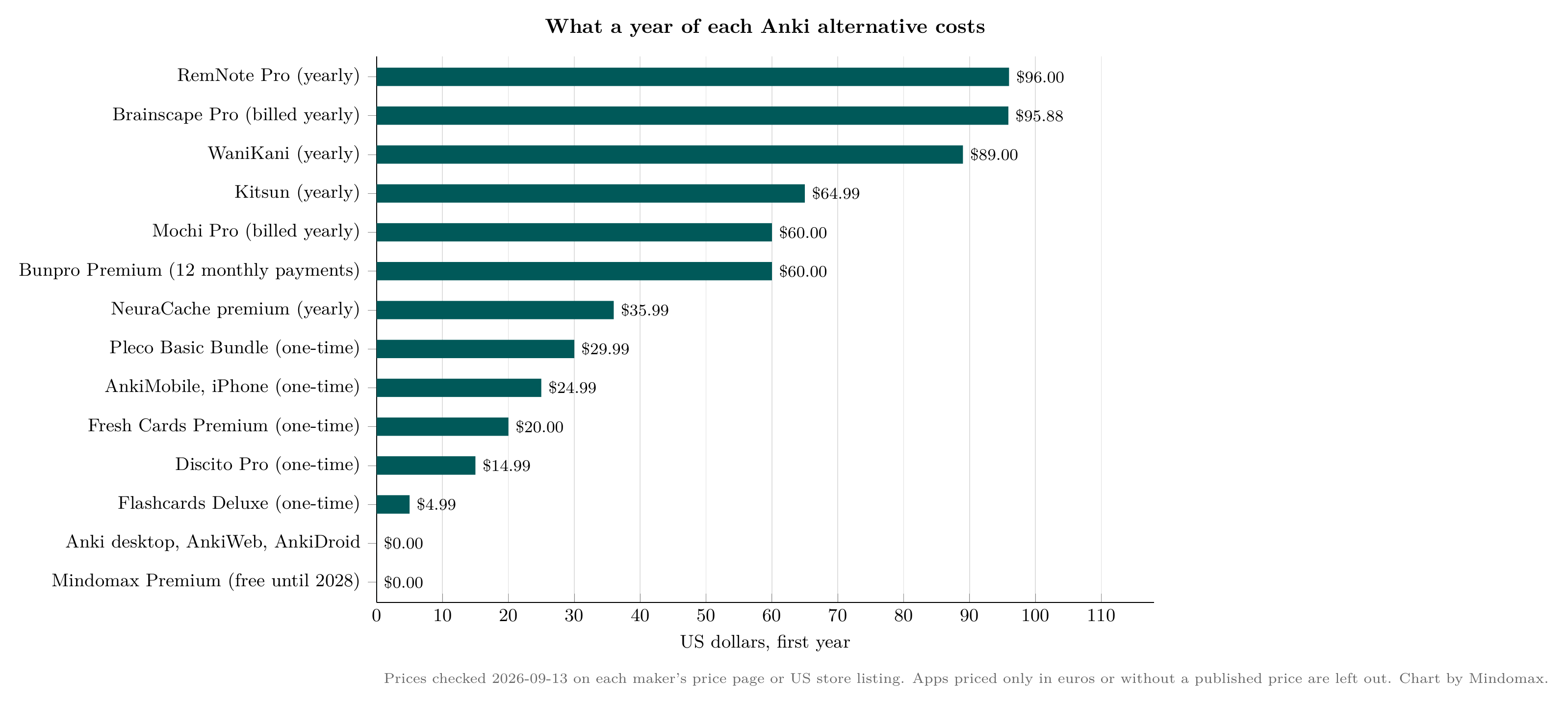
First-year cost of each paid plan in US dollars, from each maker's own price page or store listing, checked 2026-09-13. One-time purchases count once, yearly plans at their yearly price, Bunpro at twelve monthly payments. Apps priced only in euros or without a published price are left out. Chart by Mindomax.
Which One Should You Pick?
Keep your decks and FSRS for free: Space, or Mochi if you like Markdown and offline study. An iPhone without a subscription: Discito. Private study on a Mac: Avorio. Notes first: RemNote, the Obsidian plugin, or Hashcards if you live in git. No more typing cards: Gizmo, Mindomax or Vaia, leaving your old decks in Anki. One language: Pleco for Chinese, Bunpro and WaniKani for Japanese, Clozemaster for vocabulary in context.
And if Anki's only problem was the scheduler, switch on FSRS in the deck options and give it a month before you leave.
If you want AI to draft your cards and do not need your old decks, Mindomax is free to try; if your decks and their history matter more, start with Space or Mochi.
Frequently Asked Questions
What is the best free alternative to Anki?
For most people it is Space. Its free plan includes FSRS-6 scheduling, cloud sync and .apkg import on every major platform (checked 2026-09-13). Flashcards World is the other strong free option, with unlimited cards, sync and no ads.
Can I move my Anki decks to another app?
Yes, to many of them. Mochi, Avorio, Space, Flashcards World, Discito, Noji, Retain, Azri and RemNote all import Anki files, and Mochi, Avorio and Flashcards World say they keep your review history or scheduling state. Brainscape needs a text export first, and Mindomax cannot import them.
Do Anki alternatives use FSRS?
Many do: Space and Discito run FSRS-6, Avorio runs FSRS-5, and Mochi, Flashcards World, Azri, Hashcards, RemNote and the Obsidian plugin all offer FSRS. Anki has supported FSRS since version 23.10, but you have to switch it on.
Is AnkiApp the same as Anki?
No. Anki's own FAQ says AnkiApp is now called AlgoApp and Anki Pro is now called Noji, and neither comes from Anki's developers. The official apps are Anki for desktop, AnkiWeb, AnkiMobile for iPhone and AnkiDroid.


