
INTRODUCTION
A typical college week throws lecture slides, textbook chapters, problem sets, vocabulary lists, group projects, and timed exams at students all at once. No single app handles all of that. But the right combination of three or four tools can cut hours of wasted effort every week. The problem is finding the best study apps for college students when hundreds of options compete for attention, most of them recycling the same tired recommendations.
This guide takes a different approach. It covers fifteen of the best study apps for college students across six categories, tested on real coursework, and pairs every recommendation with the cognitive science that explains why certain study methods work better than others. A review by Dunlosky et al. (2013) in Psychological Science in the Public Interest rated only two techniques as "high utility" out of ten commonly used methods: practice testing and distributed practice. The best study apps for college students build these techniques into daily workflows without requiring a psychology degree to get started.

1. Google NotebookLM, Source-Grounded AI Study Assistant
Google NotebookLM stands apart from generic chatbots because it only answers from sources the student uploads. Drop in lecture slides, PDF textbooks, or Google Docs, and the AI generates summaries, flashcards, quizzes, and even audio "podcast" overviews grounded entirely in that material. Inline citations point back to specific passages, which makes it far less likely to hallucinate compared to raw ChatGPT. The free tier is generous: 100 notebooks, 50 sources per notebook, and 50 chat queries daily. The limitation is that everything runs online with no offline mode, and it only integrates with Google's ecosystem. For students who already live in Google Drive, this is the best free starting point among the best study apps for college students right now.
2. Mindomax, AI Flashcards From PDFs, Audio, and Images
Mindomax targets the single biggest reason students quit spaced repetition: creating cards takes too long. Upload a PDF, record a lecture, or snap a photo of handwritten notes. The AI generates flashcards in seconds. A built-in LaTeX editor handles formulas for STEM courses, and pronunciation support covers fourteen languages. The scheduling engine uses a proprietary system called the Windcatcher Theory, and the app includes over 450,000 pre-made cards for USMLE, MCAT, GRE, and language exams. Free allows one box with unlimited cards and three AI requests per day. Premium at $5.99 per month opens the full AI pipeline. As a late-2025 launch, the user community is still growing, and there is no Anki deck import yet. For a broader look at student-focused tools, see the study apps guide on Mindomax.
3. Knowt, the Free Quizlet Replacement
Knowt has crossed seven million users by keeping features free that Quizlet now locks behind a paywall: learn mode, practice tests, and spaced repetition. Upload notes, PDFs, or lecture videos and the AI builds flashcards and quizzes automatically.
A Chrome extension imports existing Quizlet sets with one click. The spaced repetition scheduling adapts review timing but is simpler than algorithms like SM-2 or FSRS, which makes Knowt better for short-term exam prep than multi-year retention. The free tier is one of the most generous among the best study apps for college students. Ultra runs about $5 per month for unlimited AI and the Kai chatbot tutor.
4. RemNote, Where Notes Turn Into Flashcards
RemNote solves a workflow problem that most apps ignore: the gap between taking notes and studying them. Type a double-colon shortcut inside any bullet point and it becomes a flashcard, linked to its original context. The app supports both the classic SM-2 algorithm and the newer FSRS machine-learning scheduler. PDF annotation, image occlusion, and a knowledge graph connecting concepts across documents come built in. AI features on the Pro tier generate cards from PDFs and include lecture recording. Pro costs about $8 per month with a student rate around $6. The learning curve is steeper than dedicated flashcard tools, and AI credits on the standard plan can run out quickly.
5. Anki, the Gold Standard for Spaced Repetition
Anki has earned its reputation over nearly two decades. The spaced repetition engine schedules reviews at intervals timed to the edge of forgetting, and the shared deck library covers nearly every subject imaginable. Medical students rely on community decks like AnKing for board exams. A 2013 meta-review confirmed that the techniques Anki automates rank among the most effective study methods ever tested. In late 2023, Anki integrated FSRS, a machine-learning scheduler that typically reduces reviews by twenty to thirty percent at the same retention level. Free on desktop and Android.
The iOS app costs $24.99, a one-time purchase. The interface is dated, card creation is manual, and new users often spend more time configuring than studying.
Download: iOS · Android · Desktop
6. StudyFetch (Spark.E), Live Lecture AI Tutor
StudyFetch takes uploaded materials and builds an AI tutor around them. The Spark.E assistant answers questions grounded in those uploads, generates flashcards and quizzes, and offers a live lecture mode that takes notes in real time as the professor talks. A gamified Arcade mode turns review sessions into something closer to a mobile game than homework. The platform reports over six million users.
Free is restrictive: ten chats, one study set, two uploads. Base costs $7.99 per month. Premium at $11.99 per month opens unlimited features. The honest caveat: accuracy drops on chemistry formulas, medical notation, and advanced math. Every auto-generated card should be reviewed before trusting it for an exam.
7. Quizlet, the Largest Flashcard Library
Quizlet still owns the biggest library of user-created study sets. If a popular course exists, someone has already made a deck for it. The Learn mode adapts to weak spots, and matching games add variety to review sessions. "Magic Notes" now generates flashcards from uploaded documents. The free tier comes with ads and limited features. Quizlet Plus costs $35.99 per year and unlocks Learn mode, offline access, and AI features. That paywall migration has pushed many students toward free alternatives like Knowt. But for quick access to millions of pre-made sets, Quizlet still has no real competitor in raw library size. The spaced repetition is basic compared to Anki or FSRS-powered apps.
8. Goodnotes 6, AI-Powered Handwriting for iPad
Goodnotes 6 is the top pick for students who take notes by hand on an iPad. The 2025-2026 updates added AI spellcheck that works inside handwriting, AI math assistance with interactive problem-solving, and scribble-to-erase gestures. Audio recording syncs to handwritten notes. The app won Apple's iPad App of the Year and has over 381,000 reviews at 4.7 stars. Free allows three notebooks.
Essential costs $11.99 per year, and Special Edition is $35.99 one-time for Apple devices. The optional AI Pass add-on at about $9.99 per month unlocks the full AI features. Android and Windows support arrived in 2025 but the experience is still best on Apple hardware.
9. Obsidian, Free Local-First Knowledge Base
Obsidian stores notes as plain Markdown files on the local device. No cloud dependency, no subscription needed for core features. Notes link to each other, and a graph view shows how concepts connect across courses and semesters. The plugin ecosystem is enormous: spaced repetition, PDF annotation, daily journals, Kanban boards, and hundreds more. Medical students, law students, and graduate researchers use it to build knowledge bases that grow over years. Free for personal use.
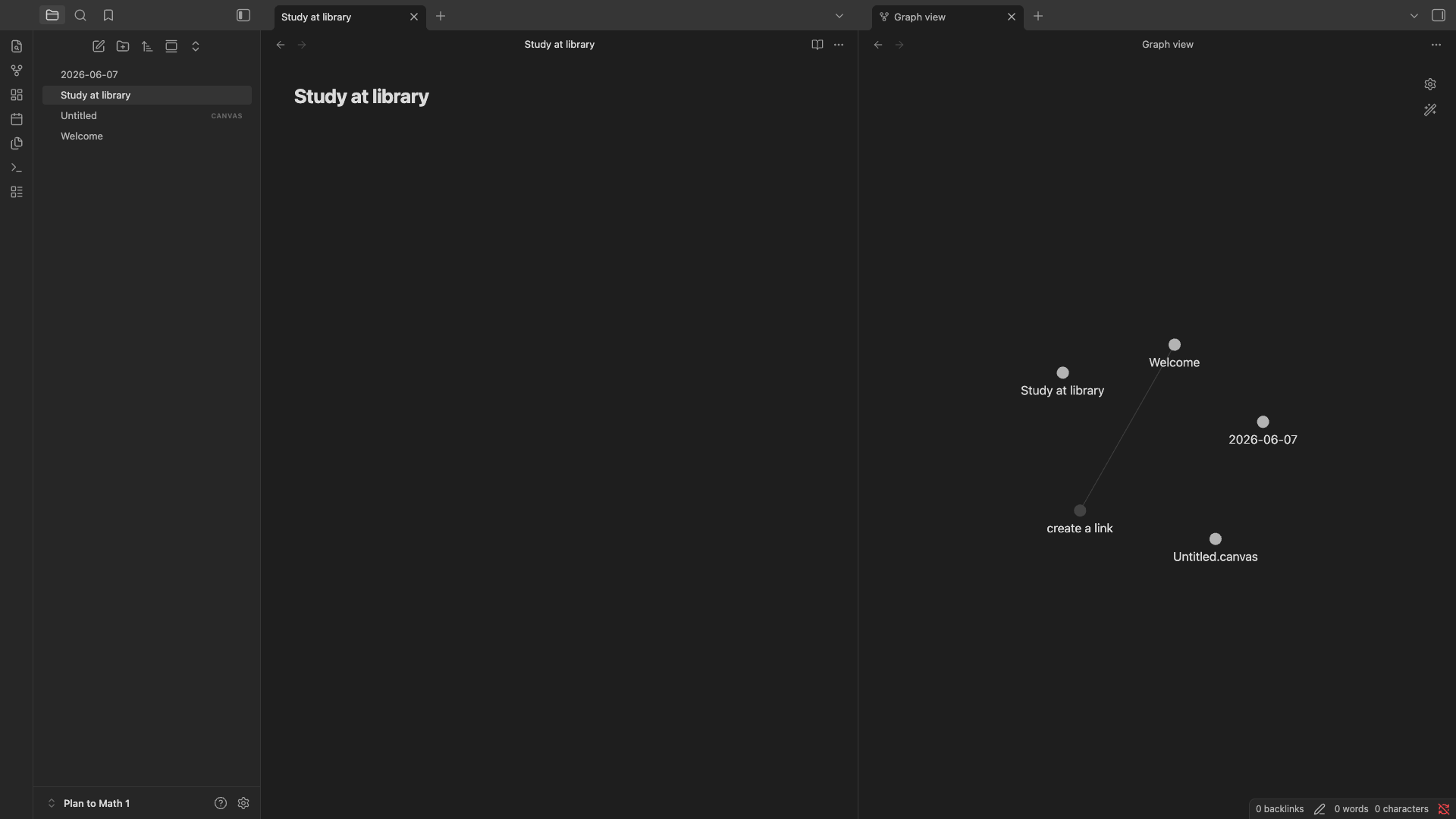
Sync across devices costs $4 to $5 per month with a 40 percent student discount. The learning curve is real. There are no pre-built templates, and the interface assumes comfort with plain text. But for students willing to invest an afternoon in setup, nothing else offers this level of ownership over their own notes.
Download: iOS · Android · Desktop
10. Wolfram Alpha, the Reliable STEM Problem Solver
Wolfram Alpha does not guess. Unlike language models that sometimes fabricate math solutions, Wolfram Alpha uses deterministic symbolic computation to produce mathematically proven results. It handles calculus, statistics, chemistry, physics, and engineering problems with step-by-step solutions. The free version answers basic queries. Pro at about $5 to $7 per month for students unlocks step-by-step breakdowns for every problem. For STEM-heavy majors, this is one of the best study apps for college students that most listicles underrate. The limitation is that it does not handle essay-based or qualitative questions. It is purely a computation engine.
11. Cold Turkey, the Strictest Focus Blocker
Cold Turkey does one thing and does it without compromise: it blocks distractions. Once a block starts, it cannot be bypassed. Not by restarting the computer, not by uninstalling the app, not by changing the system clock. The "Frozen Turkey" mode locks the entire machine. Scheduled blocks can enforce study sessions automatically. The free version handles cancellable blocks. Pro is a one-time $39 purchase and adds locked blocks, app blocking, and usage stats. The catch is that Cold Turkey only works on Windows and Mac. No mobile apps. Students whose distractions live on their phones will need a second blocker like Freedom ($3.33 per month annually) for cross-device coverage.
Download: Windows / Mac
12. Otter.ai, Real-Time Lecture Transcription
Otter.ai transcribes lectures in real time with speaker identification, searchable text, and AI-generated summaries. It joins Zoom, Teams, and Google Meet calls automatically and creates a record that students can search by keyword after class. The free tier gives 300 minutes per month with a 30-minute cap per conversation. Pro costs about $8.33 per month billed annually, and students with a .edu email get 20 percent off. The main limitation is language support: English, French, and Spanish only. Otter also reduced Pro minutes from 6,000 to 1,200 per month in 2025 without lowering the price, which frustrated long-time users.
13. Forest, Gamified Focus Sessions
Forest turns staying off the phone into a game. Start a focus timer and a virtual tree begins growing. Leave the app to check social media and the tree dies. Over time, consistent study sessions grow a full forest. The psychology is simple and effective. Shared forests let study groups hold each other accountable. Forest partners with a real tree-planting organization, so focused minutes translate into actual trees. About $3.99 one-time on iOS, free with ads on Android. The app does exactly one thing. No flashcards, no notes, no AI. Just a timer that punishes distraction with a dead tree. Among the best study apps for college students for focus, it remains the most popular gamified option.
14. Zotero, Free Reference Manager for Research Papers
Zotero is free, open-source, and run by a nonprofit. It collects sources from the web with one click, organizes them into folders, annotates PDFs, and generates citations in over 9,000 styles. Word, LibreOffice, and Google Docs integrations insert formatted references directly into papers. Free storage is 300 MB. Paid plans start at $20 per year for 2 GB, and many universities provide unlimited institutional storage. For any student writing research papers, this belongs in the toolbox from day one. The interface feels dated compared to newer alternatives like Paperpile, but the price (free) and the breadth of citation styles are hard to beat.
Download: iOS · Android · Desktop
15. Perplexity AI, Cited Research on Demand
Perplexity AI answers questions with inline citations from real sources. An Academic Focus mode filters results to peer-reviewed papers only, which makes it a strong research companion for term papers and literature reviews. Upload documents and ask questions about them. The free tier handles unlimited standard searches. Education Pro costs $10 per month for verified students (half the regular price). A referral program lets students stack free months. The limitation is that citation accuracy depends on available web sources, and less-studied topics sometimes return thin results. For everyday research tasks among the best study apps for college students, it is faster than manually searching Google Scholar.

How to Pick the Right Combination
No student needs fifteen apps. When choosing the best study apps for college students, most do best with three or four that cover the core study tasks: capturing material, reviewing it actively, blocking distractions, and managing references when writing papers. The table below maps each tool to its primary strength and real cost.
A practical starting stack for most students: NotebookLM for processing readings and lecture slides, Knowt or Anki for active review, a focus blocker for study sessions, and Zotero if research papers are part of the workload. Add Mindomax or RemNote if flashcard creation from raw materials is the main bottleneck. Add Wolfram Alpha for STEM. That covers about ninety percent of what the best study apps for college students need to handle.
Why Active Recall Beats Passive Review
Most students study by rereading notes and highlighting textbooks. It feels productive. The material looks familiar. But familiar is not the same as remembered. Understanding why certain techniques work better than others is what separates the best study apps for college students from the ones that just look nice. Dunlosky et al. (2013) reviewed ten common study techniques and gave highlighting and rereading the lowest effectiveness rating. The two techniques that earned the highest rating were practice testing and distributed practice.
Practice testing is the formal term for active recall. When a flashcard appears and the learner retrieves the answer from memory before checking, that act of retrieval strengthens the memory trace in ways that passive rereading cannot replicate. Roediger and Butler (2011) showed in Trends in Cognitive Sciences that retrieval practice ranks among the most effective long-term retention methods. A meta-analysis by Rowland (2014) confirmed the effect across hundreds of studies with an overall effect size that favored testing over restudying.
Karpicke and Blunt (2011) published a particularly striking result in Science. Students who practiced retrieval outperformed students who created elaborate concept maps, even though concept mapping is itself an active strategy. The act of pulling information out of memory, not just reorganizing it, produced the strongest learning gains.
A more recent meta-analysis by Adesope, Trevisan, and Sundararajan (2017) in the Review of Educational Research synthesized 272 effect sizes across 118 studies. Practice testing produced medium-to-large effects on retention compared to re-reading, with benefits that held across age groups, subject areas, and testing formats.
This is why every spaced repetition app on this list, from Anki to Mindomax to Knowt, builds its core experience around the same principle: show a prompt, force retrieval, then reveal the answer. The apps differ in design and algorithm. The underlying science is the same.
The Forgetting Curve and Why Spacing Works
In 1885, Hermann Ebbinghaus published the first experimental study of memory decay. A replication by Murre and Dros (2015) confirmed his core finding: without review, most people forget fifty to seventy percent of new information within twenty-four hours. The curve is steep and predictable.
But each review at the right moment flattens that curve. Cepeda et al. (2006) analyzed 254 studies in the Psychological Bulletin and found that distributing study sessions over time consistently outperformed cramming, regardless of subject or age. Kang (2016) confirmed in Policy Insights from the Behavioral and Brain Sciences that spaced practice produces substantially better long-term learning than massed practice.
The key insight is timing. Review too early, and the brain has not yet started to forget, so the review adds little. Review too late, and the memory is already gone, requiring relearning from scratch. This timing problem is exactly what the best study apps for college students solve with automated scheduling. Kornell (2009) demonstrated in Applied Cognitive Psychology that algorithmically spaced reviews outperformed self-paced schedules, even when students believed their own timing was better.
The data above comes from Roediger and Karpicke (2006), who found that students who tested themselves repeatedly retained roughly twice as much after one week as those who only re-read the material. The re-reading group felt more confident about their knowledge, yet performed worse. Feeling familiar with material is not the same as being able to recall it under exam conditions.
Latimier, Peyre, and Ramus (2021) ran a meta-analysis of 29 studies (39 effect sizes) and reported a strong benefit of spaced retrieval practice compared to massed retrieval practice, with an effect size of g = 0.74. That is a large effect in educational research.
This is exactly what spaced repetition software automates. Anki, RemNote, Mindomax, and Brainscape all schedule cards at increasing intervals timed to the edge of forgetting. The student does not need to guess when to review. The algorithm handles timing. The student just needs to show up.
How Algorithms Differ Across Study Apps
Not every spaced repetition algorithm produces identical results. SM-2, the algorithm Anki has used since its creation, adjusts review intervals based on a fixed ease factor that shifts with each self-rating. It works well but treats every learner identically.
FSRS, now available in both Anki and RemNote, takes a different approach. Trained on actual review data from hundreds of millions of cards, it personalizes scheduling to individual memory patterns. Upadhyay et al. (2021) found in npj Science of Learning that machine-learning-based scheduling helped students retain content roughly sixty-nine percent longer than fixed schedules. The FSRS algorithm (Ye et al. 2022) has been benchmarked across 350 million reviews from nearly 10,000 users, showing twenty to thirty percent fewer reviews needed at the same retention rate.
Other tools take proprietary paths. Mindomax uses its Windcatcher Theory. Knowt uses adaptive review. Quizlet adjusts based on Learn mode performance. Brainscape uses confidence-based repetition rated on a 1-5 scale. None of these proprietary systems publish independent benchmarks, which means the evidence stays private. That does not mean they fail. It means the comparison is opaque.
The practical takeaway: any spaced system beats no system. This matters when evaluating the best study apps for college students, because the gap between using spaced repetition and not using it is far larger than the gap between algorithms. Soderstrom and Bjork (2015) showed in Perspectives on Psychological Science that conditions which slow initial learning, like spacing and testing, produce superior long-term retention. The differences between algorithms matter at the margins. The massive gain comes from using spaced repetition at all instead of cramming.
AI in the Study Workflow: What It Changes and What It Does Not
AI study tools save time on one specific bottleneck: creating study materials. Turning a 40-page PDF into flashcards by hand takes hours. NotebookLM, Mindomax, StudyFetch, and Knowt each do it in minutes. That is a real efficiency gain. Carpenter (2012) noted in Current Directions in Psychological Science that the testing effect transfers across question formats, meaning AI-generated questions still produce learning benefits even when they differ from exam format.
But AI does not replace the learning itself. Carpenter et al. (2012) showed that active retrieval is what drives retention, not the act of creating cards. Students who use AI-generated cards and then review them actively learn effectively. Students who let AI summarize everything and then passively skim those summaries gain little.
Rawson and Dunlosky (2012) found in the European Journal of Cognitive Psychology that initial learning must reach a threshold before practice testing is most effective. This means AI summaries can help with first-pass understanding, but the heavy lifting of retention still requires active retrieval.
The best study apps for college students in 2026 combine AI generation with active review. Use AI to build the deck. Then use spaced repetition to drill it. Skipping the second step defeats the purpose.
The chart above reflects effectiveness ratings from the Dunlosky et al. (2013) review, weighted by utility ranking. Active recall and spaced review together account for the majority of evidence-backed study effectiveness. Highlighting, the most common student habit, sits at the bottom.

Handwritten vs Typed Notes: What the Research Actually Says
A widely cited study by Mueller and Oppenheimer (2014) found that students who took handwritten notes performed better on conceptual questions than laptop typists. The explanation was that handwriting forces selective processing: students must summarize and paraphrase because they cannot write fast enough to transcribe verbatim.
But the finding has not replicated cleanly. Pashler et al. (2007) and subsequent replication attempts found that the advantage depends more on how students process the material than on the medium itself. A student who types selectively and summarizes actively may retain just as much as a student who writes by hand. A student who transcribes verbatim on a laptop will remember less regardless.
The implication for choosing among the best study apps for college students: Goodnotes and Notability work well for students who process information through handwriting. Obsidian, Notion, and RemNote work well for students who type with intention. The tool matters less than the habit of active processing behind it.
CONCLUSION
The science points in one direction. Retrieval practice combined with spaced timing produces durable long-term memory. That has been confirmed across hundreds of studies over more than a century. What changed in 2025 and 2026 is the tooling. AI turns raw lectures into flashcards in minutes. Open-source algorithms like FSRS personalize review schedules. And fifteen credible tools, from NotebookLM and Mindomax to Anki, Knowt, and the others on this list, make evidence-based studying accessible without an engineering background. The best study apps for college students are the ones that get used daily. Pick three that fit the workflow. Show up for reviews. The rest takes care of itself. For more on how spaced repetition apps compare in 2026, the detailed breakdown covers algorithms, pricing, and real trade-offs.

Frequently Asked Questions
What are the best free study apps for college students?
Google NotebookLM, Knowt, Anki (desktop and Android), Obsidian, Zotero, and Forest (Android) all offer strong free tiers. NotebookLM stands out because it generates flashcards, quizzes, summaries, and audio overviews from uploaded course materials at no cost. Most students can build an effective study system without spending anything.
How many study apps should a college student use?
Three to four apps covering different needs works well for most students. A typical effective stack includes one app for processing materials (NotebookLM or StudyFetch), one for active review (Anki, Knowt, or Mindomax), one for focus (Forest or Cold Turkey), and optionally one for references (Zotero) if writing research papers.
Is Anki still worth using in 2026?
Anki remains the strongest spaced repetition engine available. Its FSRS scheduler, integrated in late 2023, reduces reviews by twenty to thirty percent compared to the classic SM-2 algorithm. The shared deck library is unmatched. The trade-off is a dated interface and a steep learning curve. Students willing to invest setup time get the strongest long-term results.
Are AI study apps accurate enough for exam prep?
AI-generated flashcards and summaries save significant time but are not error-free. Accuracy is high for straightforward factual content in humanities and social sciences. It drops for chemistry formulas, medical notation, and advanced mathematics. Every AI-generated card should be reviewed before trusting it for graded work.
What is spaced repetition and why does it work?
Spaced repetition is a study method that schedules reviews at increasing intervals timed just before the learner is about to forget. It works because each successful retrieval at the edge of forgetting strengthens the memory trace. Research consistently shows it produces better long-term retention than cramming or re-reading.
Can study apps replace traditional studying?
Study apps automate scheduling and material creation, but they do not replace the mental effort of learning. Active recall, where the student retrieves information from memory, is what produces retention. Apps that only summarize content passively are less effective than apps that quiz the learner and force retrieval.
What is the difference between Quizlet and Knowt?
Quizlet has the larger library of pre-made study sets but now locks core features like Learn mode behind a $35.99 per year paywall. Knowt offers similar AI flashcard generation, learn and test modes, and spaced repetition for free. Knowt also supports one-click Quizlet import. The main Quizlet advantage is library size.
Do handwritten notes work better than typed notes?
Early research suggested handwriting improves retention, but later studies found the advantage depends on active processing, not the medium. Students who summarize and paraphrase while typing retain just as much. Goodnotes and Notability serve handwriting-first learners. Obsidian and RemNote serve typists. The habit matters more than the tool.
How much should a college student spend on study apps?
Most students can build a strong system for free using NotebookLM, Knowt or Anki, and a focus blocker. Students who want premium features typically spend five to twelve dollars per month on one or two paid tools. Spending more than twenty-five dollars monthly on study subscriptions is rarely justified.
Which study app is best for medical students?
Anki remains the standard for medical education. The AnKing shared deck covers USMLE content thoroughly, and the FSRS scheduler reduces review load. Mindomax offers pre-made USMLE and MCAT decks with AI generation. RemNote works well for students who want notes and flashcards in one place. Wolfram Alpha handles biochemistry computations.


