
INTRODUCTION
Most articles about the best study apps name the same sixteen products. Anki, Quizlet, Notion, Obsidian, Goodnotes, OneNote, Forest, Todoist, Google Calendar, Grammarly. Read two of them and you have met every app on the first page of Google. Worse, almost none of them tells you what anything costs today. One of the pages currently ranking for this search quotes prices from February 2021 and presents them as current; another runs to 2,862 words about which apps to buy without printing a single dollar figure.
This article does the opposite. Twenty-four apps, every one confirmed alive on its store listing on 16 September 2026, every price read from the vendor's own pricing page or its US App Store listing on that same day, and the free-tier ceiling written down as a number rather than waved at with the word "freemium". Fourteen of the twenty-four appear on none of the competing pages. Each entry also names one thing the app is bad at, including ours, because a list where everything is excellent is an advertisement.
The 24 study apps at a glance
Prices are US prices for individual users, read on 16 September 2026 from each vendor's pricing page or, where no pricing page is published, from the app's US App Store in-app purchase list. Every one of the twenty-four listings was checked the same day and all twenty-four are alive and updated.
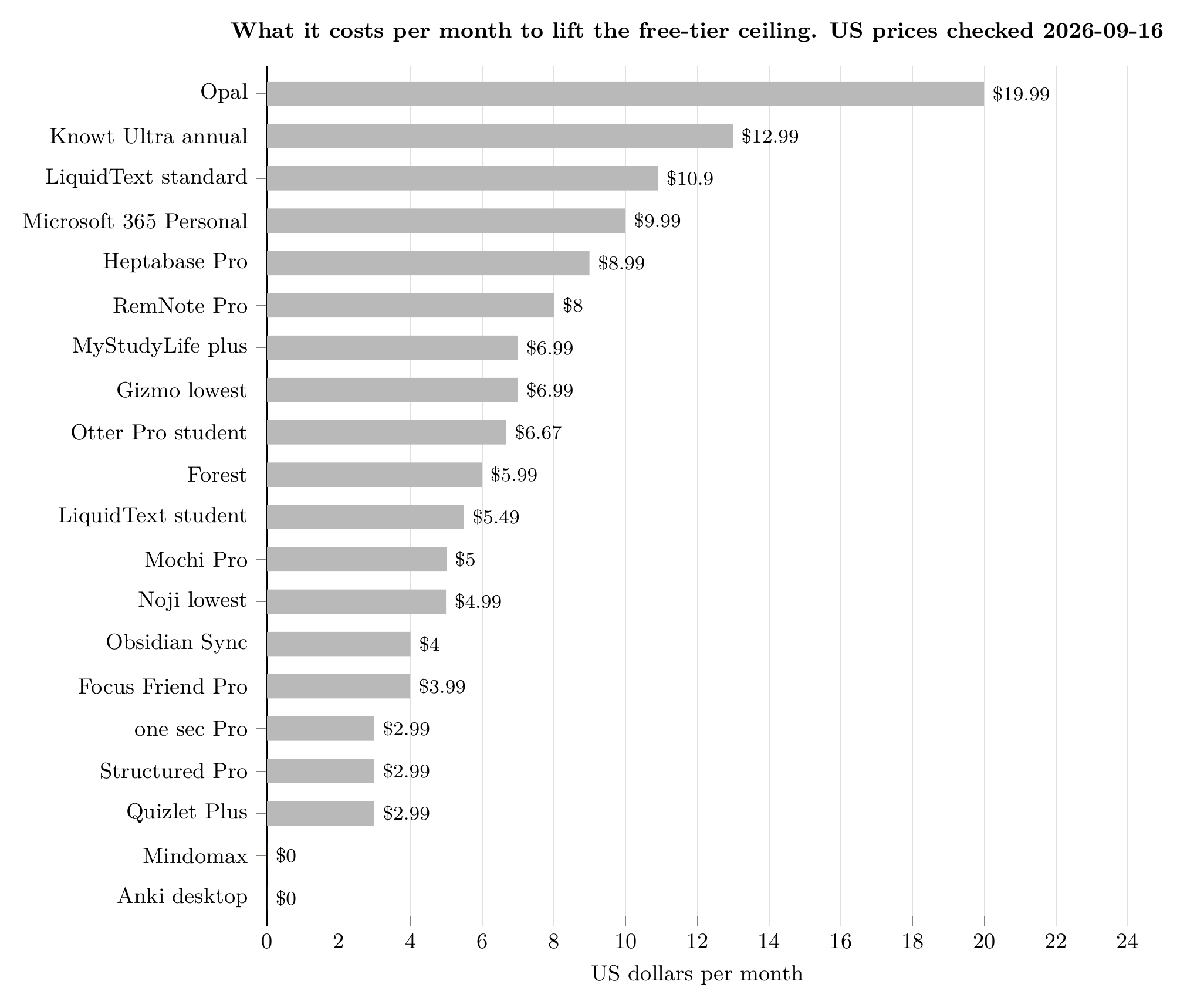
What it costs per month to lift the free-tier ceiling. Twenty of the twenty-four apps in this article, cheapest last. Prices read from each vendor's pricing page or its US App Store in-app purchase list on 2026-09-16. Chart by Mindomax.
Flashcards and active recall
1. Anki - no limits, free everywhere except iPhone
Still the only app here with no ceiling of any kind: unlimited cards, unlimited decks, free sync, and a scheduler that has been refined for twenty years. It is free on Windows, Mac, Linux, Android and the web; the single paid piece is AnkiMobile for iPhone and iPad at $24.99, paid once (checked 2026-09-16). What Anki actually costs is a question with a longer answer than most people expect. The flaw: the interface is two decades old and the deck options are a wall of numbers. Most people who abandon Anki abandon it in week one, before the scheduler has had a chance to do anything for them.
2. Mindomax - AI cards from PDFs, audio and images
Mindomax turns a PDF, a lecture recording or a photograph of a page into a reviewable deck, then schedules it. The free plan is $0 forever with one box and unlimited cards inside it, and premium is currently listed at $0, free until 2028 (checked 2026-09-16). The flaw, stated plainly: it is the newest app in this article by years. Its App Store listing carried zero ratings on 16 September 2026, against 165,000 for AnkiDroid. Nothing about it is proven at the scale Anki and Quizlet are proven at, and anyone who needs a tool that will certainly still exist in 2031 should weigh that.
3. Quizlet - the biggest deck library, and the tightest meter
The library is the product: tens of millions of decks somebody else already made. Quizlet Plus is $2.99 a month billed at $35.99 a year, and Plus Unlimited is $3.75 a month billed at $44.99 a year (checked 2026-09-16). Here is the detail nobody prints: Plus, the tier you paid for, is itself metered at three practice tests and three Q and A questions a month. You have to buy the second paid tier to stop counting. Our full breakdown of what Quizlet Plus costs and what it caps goes through each limit.
4. Noji - a polished mobile deck nobody writes about
A genuinely polished mobile flashcard app with 13,861 App Store ratings and a 4.6 average, updated on 11 September 2026, and it appears on none of the pages currently ranking for this search. Premium starts at $4.99 a month, with annual plans listed at $44.99 and $89.99 and a lifetime option at $74.99 (checked 2026-09-16). The flaw is that list: several overlapping subscription products sit on the same listing, which makes it genuinely hard to know in advance what you will be charged.
5. Mochi - free offline forever, sync is the paid part
Markdown in, cards out, with unlimited offline use on a free plan that needs no sign-up at all. Pro is $5.00 a month and what it buys is sync (checked 2026-09-16). That is the trade the free tier makes, and it is an honest one: free means one device. The flaw is scale. Mochi had 173 App Store ratings on 16 September 2026, so if the developer stops, there is no community to carry it.
6. RemNote - notes that turn into flashcards
Notes and flashcards in one document, so the card is made while you are reading rather than afterwards. Free is $0, Pro is $8.00 a month or $96 billed yearly, and Pro with AI is $18.00 a month or $216 yearly (checked 2026-09-16). RemNote is one of the very few apps that publishes its free-tier ceiling in numbers: three annotated PDFs, five image-occlusion cards, one handwritten document. The flaw is the learning curve, which is the steepest here after Anki. We compared the two directly in RemNote against Anki.
7. Knowt - the one that imports your Quizlet sets
The practical reason students use it is that it imports Quizlet sets, which matters if a class shared its decks there. Ultra is $12.99 a month billed upfront at $149.99 a year, or $24.99 month to month, after a three-day trial (checked 2026-09-16). The flaw is the price: $149.99 a year is the most expensive plan in this article, and paying monthly costs almost double the annual rate.
8. Gizmo - a daily streak instead of a study plan
Gamified recall built around a daily streak, with 13,793 App Store ratings at 4.8 and an update on 14 September 2026. Gizmo Unlimited in-app purchases start at $6.99 (checked 2026-09-16). It earned its place here the honest way: students named it unprompted in the Reddit thread that outranks every article on this search. The flaw is the same as the appeal. The streak is the product, and for some people protecting a streak quietly replaces studying.
Notes, PDFs and reading
9. Obsidian - your notes as files you own
Plain Markdown files on your own disk, which means the notes outlive the company. Free for personal use; Sync is $4.00 per month billed annually or $5.00 monthly, and the optional Catalyst licence is $25.00 once (checked 2026-09-16). The flaw is the other side of the same coin: nothing is backed up unless you arrange it, and a lost laptop is a lost degree's worth of notes.
10. Microsoft OneNote - free if your university gave you an account
Free with a Microsoft account, which most universities hand out, and Microsoft 365 Personal is $9.99 a month or $99.99 a year if you want the rest of Office (checked 2026-09-16). Handwriting search works well. The flaw is organisation: past a few hundred pages the notebook-section-page hierarchy becomes a filing problem of its own. The alternatives are all more opinionated, and most of them cost money.
11. Goodnotes - the iPad default, and its three-notebook ceiling
The default iPad notebook, with 453,401 ratings. Essential is $11.99 a year, Pro is $35.99 a year, and the AI Pass is a further $9.99 a month on top (checked 2026-09-16). The free-tier ceiling, which Goodnotes publishes and nobody quotes: three notebooks, three text documents, three whiteboards, 100 MB of storage. The flaw is that AI Pass. Paying monthly for features layered on an annual plan you have already bought is the least honest pricing structure in this article.
12. Noteful - Goodnotes without a subscription
The reason it is here: it does most of what Goodnotes does on an iPad, and Noteful Pro is a $6.99 one-time purchase with no subscription anywhere (checked 2026-09-16). It has 23,472 ratings at 4.8 and was updated on 8 September 2026, and it appears on none of the competing lists. The flaw is platform lock: iPad and iPhone only, so switching to Windows or Android later means starting again.
13. MarginNote 4 - PDF to mind map to flashcards
Nothing else in this article does what MarginNote does. It turns a PDF into a mind map and the mind map into flashcards, inside one document, which is the actual workflow for a dense textbook. Unlock Pro Forever is $12.99, once (checked 2026-09-16). The flaw is density. The 4.5 average across 726 ratings hides a real split between people who love it and people who could not find the feature they wanted.
14. Flexcil - reading and annotating in one window
Reading and note-taking in one window, on iPad and Android. Flexcil Standard is $9.99 once and Premium is $8.99 (checked 2026-09-16). The flaw is the listing itself, which is still cluttered with retired planner packs from 2021 to 2023, making the current offer hard to read before you buy.
15. LiquidText - four papers side by side
Built for the specific problem of holding four papers side by side and pulling threads between them, which is what a literature review actually is. LiquidText Live is $10.90 a month or $99.99 a year, and there is published student pricing at $5.49 a month or $54.90 a year (checked 2026-09-16). The flaw: the tier names do not explain themselves, and buying the wrong one is expensive.
16. Heptabase - a whiteboard for a dissertation
A whiteboard you think on, aimed squarely at a dissertation. Pro is $8.99 a month billed yearly with 100 AI credits a month; Premium is $17.99 a month with 1,800 credits (checked 2026-09-16). The flaw is stark: there is no meaningful free tier, and with 69 App Store ratings this is an early product charging a mature product's price.
Focus, and not the four everyone else names
17. Forest - the tree that dies if you pick up the phone
Plant a tree, leave the phone alone, watch it die if you do not. Free to download, with subscription in-app purchases at $5.99 monthly and $32.49 to $35.99 annually, plus consumable coin packs from $0.99 (checked 2026-09-16). The flaw is that in-app currency, which makes the real cost of the app genuinely hard to state.
18. Focus Friend - a free timer people actually keep
A bean that knits while you work, from Hank Green, with 6,952 ratings at 4.8 and an update on 9 September 2026. It is on no competing list and it should be. Pro is $3.99 a month, $19.99 a year or $39.99 for life, and the timer itself works without it (checked 2026-09-16). The flaw is that it is, unavoidably, a bean that knits. If cute does not motivate you, nothing in this category will.
19. one sec - a breath instead of a block
A different mechanism from every blocker on every other list. Instead of locking an app, it inserts a forced breath and a short delay before the app opens, which defeats the reflex rather than the intention. Pro is $2.99 a month, $19.99 a year or $99.99 for life (checked 2026-09-16). The flaw is honest and obvious: it is a speed bump, not a wall, and a determined person walks straight over it.
20. Opal - hard blocking across every device
The serious one, blocking across iPhone, Android and Mac together, with 87,903 ratings. It is $19.99 a month or $99.99 a year, and there is a separate student SKU listed at $9.99 weekly (checked 2026-09-16). The flaw is the price. A hundred dollars a year is a lot to spend on not opening Instagram, and Opal does not publish what the free version withholds. Our roundup of focus apps for studying has the cheaper options.
Planning the week
21. Structured - the day as a timeline
A day drawn as a single timeline rather than a list, with 165,887 App Store ratings, more than any planner on any competing page, and named by none of them. Pro in-app purchases are listed at $2.99 a month, $29.99 a year and $99.99 for life (checked 2026-09-16). The flaw: it is a timeline, not a project manager. Anything with dependencies belongs somewhere else.
22. My Study Life - the only planner that understands week A and week B
Free to use, and still the only planner here that understands a rotating timetable, week A and week B, and terms that start and stop. MyStudyLife+ is $6.99 a month or $39.99 a year, with family plans above that (checked 2026-09-16). The flaw is the mirror image of its strength: it assumes a fixed institutional schedule, and an irregular one fights it the whole way.
Research and lectures
23. Zotero - references, free, until the storage runs out
Free, open source, and the only reference manager here that is not trying to sell you anything. Storage is where money appears: 300 MB free, 2 GB for $20 a year, 6 GB for $60, unlimited for $120 (checked 2026-09-16). The flaw: syncing PDFs will push you past 300 MB inside one term, at which point a free tool has quietly become a paid service.
24. Otter.ai - lecture transcripts, with a student rate
Records a lecture and gives you a searchable transcript, which turns a fifty-minute recording into something you can actually revise from. The free Basic plan allows 300 transcription minutes a month and three lifetime file imports. Pro is $16.99 a month, or $8.33 a month billed annually, and with a .edu address Otter Pro Annual is $6.67 a month billed at $79.99 a year (checked 2026-09-16). Almost nobody mentions that student rate. The flaw is acoustic: transcription quality falls apart in a large hall with a distant speaker, which is exactly the lecture you most wanted transcribed.
What "free" actually buys you
"Free" is the most common word on every competing page and the least informative. Written as numbers, on 16 September 2026, it means: three notebooks and 100 MB in Goodnotes; three annotated PDFs, five image-occlusion cards and one handwritten document in RemNote; 300 MB of storage in Zotero; and no sync at all in Mochi. Quizlet is the sharpest case, because the metering does not stop when you pay: Plus, at $35.99 a year, still allows three practice tests a month (checked 2026-09-16).
Three things here are free without an asterisk. Anki has no ceiling of any kind. OneNote is free with an account almost every student already has. Obsidian is free on your own machine, and only sync costs money. Eleven others in the table publish no free-tier limit at all, and Heptabase publishes no free tier. That silence is its own answer: if a company will not say what its free version withholds, assume it withholds the part you wanted. Our list of genuinely free study apps goes further into what each one withholds.
The nine you can buy once instead of renting
Subscriptions are not the only option, and not one of the pages ranking for this search mentions the alternative. Nine of the twenty-four can be bought outright: Noteful Pro at $6.99, Flexcil Standard at $9.99, MarginNote 4 Pro at $12.99, AnkiMobile at $24.99, the Obsidian Catalyst licence at $25.00, Focus Friend Pro at $39.99, Noji Premium at $74.99, and both Structured Pro and one sec Pro at $99.99 (all checked 2026-09-16). Over three years of a degree, a $12.99 purchase and a $12.99 monthly subscription differ by about four hundred and fifty dollars.
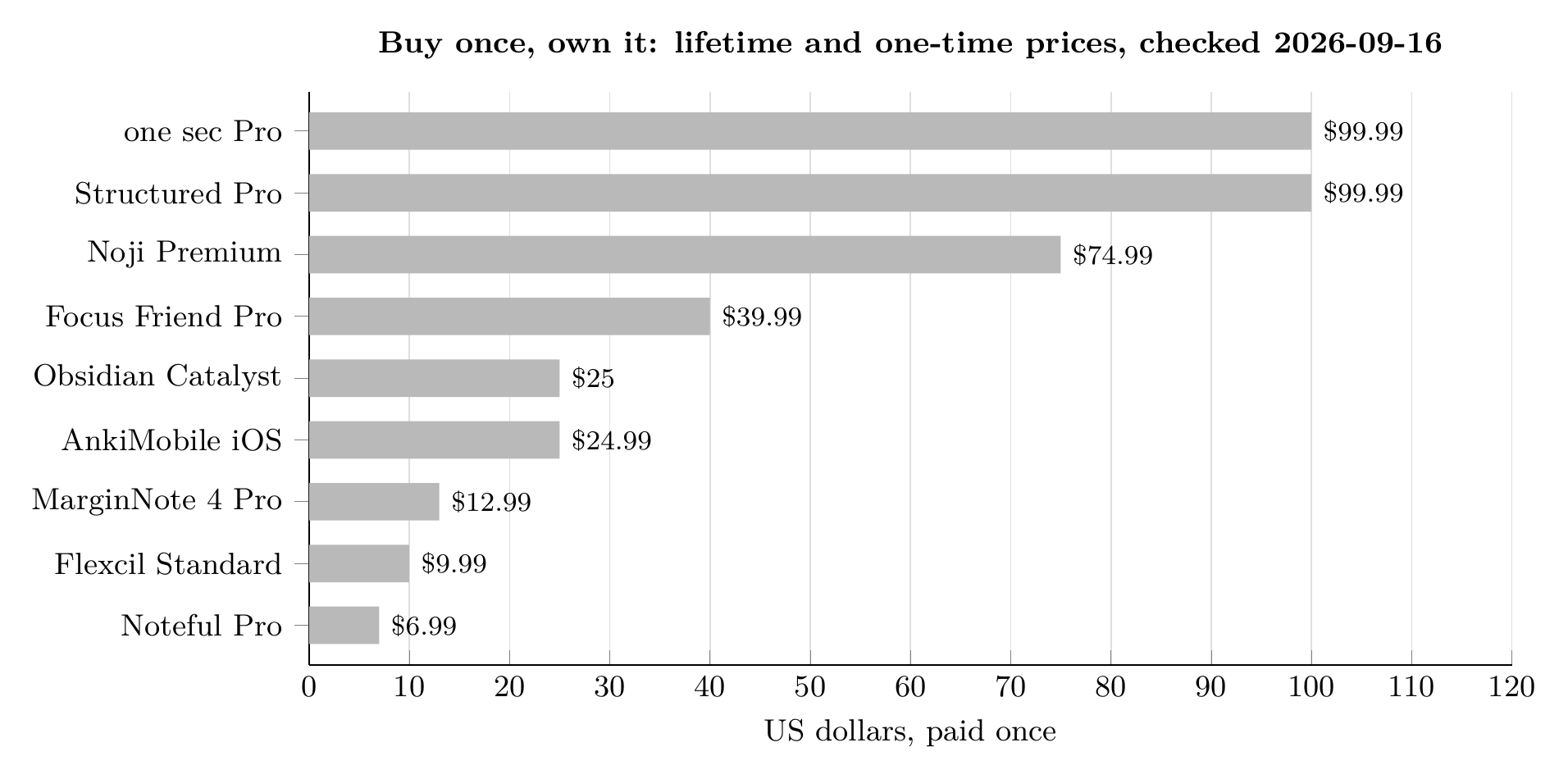
Buy once, own it. Nine of the twenty-four can still be bought outright instead of rented. One-time and lifetime prices checked 2026-09-16. Chart by Mindomax.
Student pricing is the other thing nobody writes down. LiquidText is $5.49 a month for students against $10.90 standard, Otter.ai is $6.67 against $16.99, and Opal lists a separate student rate (checked 2026-09-16). None of the eight pages currently ranking for this search mentions a single one of them.
How to pick two of these, not ten
The apps are not the hard part. A 2013 review by Dunlosky and colleagues graded ten common study techniques and gave rereading and highlighting the lowest possible rating, while practice testing and distributed practice scored highest. Every flashcard app in this article is a delivery mechanism for those two techniques, and none of them works if it is not opened.
So the sensible shape of a study setup is small: one tool that tests you, one place your notes live, and, if attention is the real problem, one thing that stands between you and the phone. That is two or three apps, not ten. Everything else on this page is a specific answer to a specific problem you may not have. The flashcard category alone, where most of the real choice lives, is covered in our flashcard app comparison.
CONCLUSION
Twenty-four apps, twenty-four listings verified alive on 16 September 2026, and every price on this page read that same day. If you take one thing from it, take the arithmetic: the cheapest way to lift a free-tier ceiling in this list is $2.99 a month and the most expensive is $19.99 (both checked 2026-09-16), nine of the twenty-four can still be bought once and owned, and three of them, including the one that has outlasted everything else, cost nothing at all. Prices move. This page says when it last looked, and any page about what software costs that does not tell you that is telling you about a different year. If the entry at number two sounded like the one you needed, Mindomax is free to try.
Frequently Asked Questions
What is the best study app overall in 2026?
For memorisation there is still no serious rival to Anki: no limits, free on every platform except iPhone, and a scheduler refined over twenty years. For notes it depends on whether you want your files on your own disk, which points to Obsidian, or handwriting on an iPad, which points to Goodnotes or Noteful. Most students need one of each, not one app that claims to do both.
Which study apps are actually free, with no catch?
Three, as of 16 September 2026. Anki has no ceiling at all. Microsoft OneNote is free with a Microsoft account most universities provide. Obsidian is free on your own device and charges only for sync. Everything else described as free in this category caps something, and where a company does not publish the cap the table above says so rather than guessing.
Is Quizlet Plus worth paying for?
Only if the pre-made decks are the reason you are there. At $2.99 a month billed at $35.99 a year (checked 2026-09-16), Quizlet Plus still limits you to three practice tests a month; removing that limit means the higher Plus Unlimited tier at $44.99 a year. For pure spaced repetition, free Anki does more than either.
Can I buy a study app once instead of subscribing?
Yes, for nine of the twenty-four here. Noteful Pro is $6.99, Flexcil Standard $9.99, MarginNote 4 Pro $12.99, AnkiMobile $24.99, Obsidian Catalyst $25.00, Focus Friend Pro $39.99, Noji Premium $74.99, and Structured Pro and one sec Pro are $99.99 each (checked 2026-09-16). Across a three-year degree the difference against a monthly plan runs into hundreds of dollars.
Do study apps offer student discounts?
Several do and almost nobody mentions them. LiquidText publishes student pricing at $5.49 a month against $10.90 standard, Otter.ai offers Pro at $6.67 a month billed $79.99 a year with a .edu address, and Opal lists a separate student rate (all checked 2026-09-16). It is always worth checking the pricing page with your university email before paying the advertised rate.
How many study apps should I use at once?
Two or three. One that tests you, one that holds your notes, and a focus tool only if attention is the actual problem. Students who keep switching tools lose the habit each time they switch, and the switching itself becomes a form of procrastination that feels like work.


