
The short answer first. If you want the most control for no money, use Anki on a computer or Android phone. If you want the modern FSRS scheduler with free sync on every device, use Space. If you are on an iPhone and hate subscriptions, look at Discito or MintDeck.
Most "best spaced repetition apps" lists are written by an app company that puts itself at number one, lists five to twelve apps, and never says which scheduling algorithm each one uses. That last part matters most. The scheduler decides when a card comes back, and a good one can save you a large share of your daily reviews for the same memory.
So this list does three things differently. It covers 26 apps, most of which you will not find on other lists. It groups them by the scheduler their makers actually document, and it says "not published" when a maker keeps that secret. And every price shows the day we checked it, because app prices change quietly.
All 26 apps were checked on 2026-09-17: each store listing is live, was updated in the last 12 months, and has real ratings.
FSRS, SM-2 and Leitner in one minute
SM-2 is the algorithm Piotr Wozniak wrote for SuperMemo in 1987. It gives each card an "ease" number and multiplies the gap between reviews by it. It is simple, well understood, and still the default in Anki.
FSRS (Free Spaced Repetition Scheduler) is newer and open source. It estimates how likely you are to forget each card and schedules the review for the moment that chance reaches your target, usually 90 percent recall. Anki has supported it since version 23.10, and FSRS-6 arrived in Anki 25.07. We explain the difference in detail in our FSRS vs SM-2 comparison.
Leitner boxes are the paper method: get a card right and it moves to a box you review less often, get it wrong and it goes back to box one. Some apps use fixed steps instead, such as 1, 10, 30 and 180 days.
The 26 apps at a glance
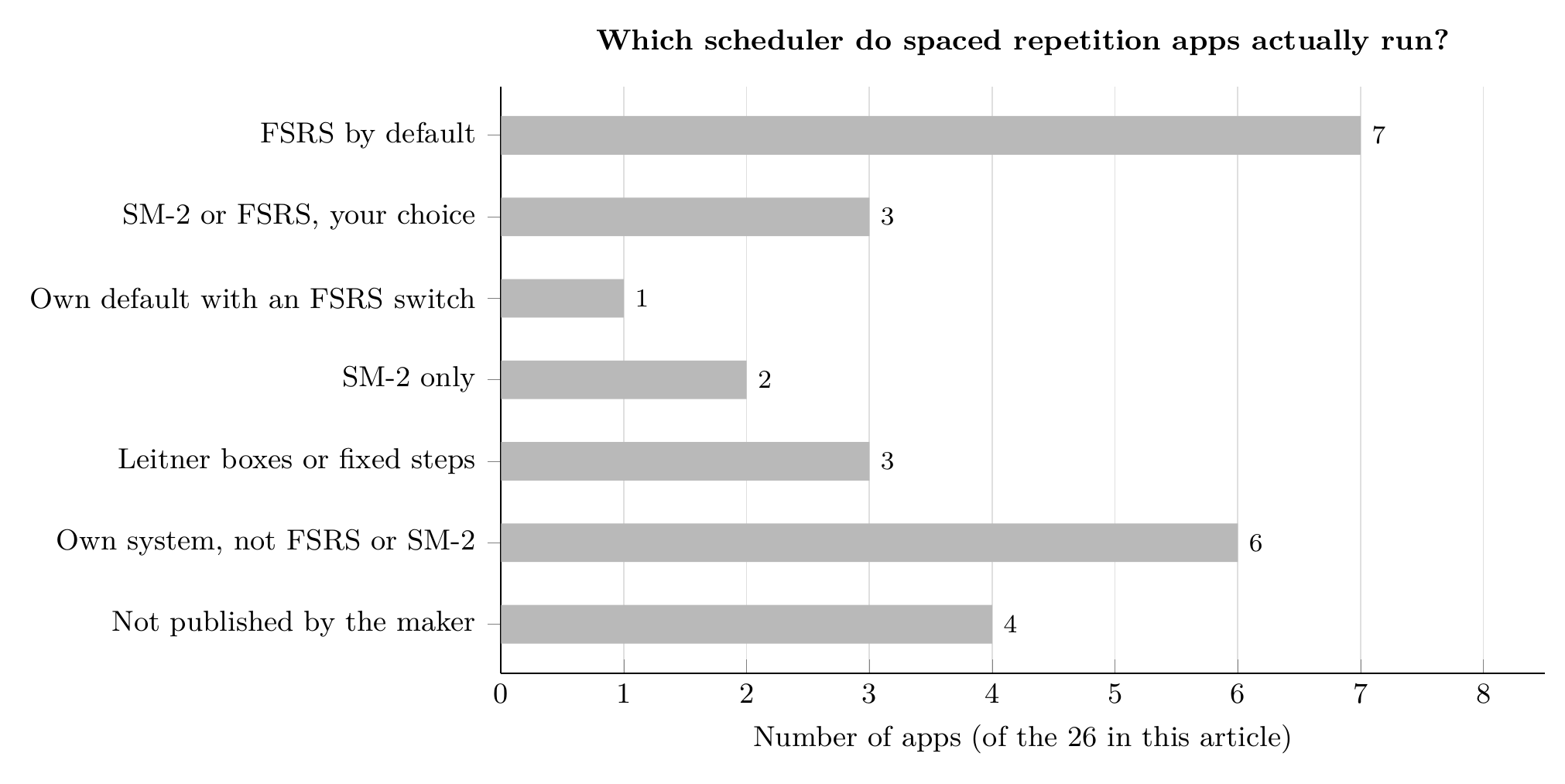
Which scheduler the 26 apps in this article run, as documented by each maker. Checked 2026-09-17. Chart by Mindomax.
1. Anki - the free standard, with a paid iPhone app
Anki is where most people start, and for good reason. The desktop app and AnkiDroid are free, the shared deck library is huge, and you can switch every deck from SM-2 to FSRS-6 in the deck options. AnkiMobile for iPhone costs $24.99 once (checked 2026-09-17).
The honest downside: it takes time to learn, and the AnkiMobile App Store listing has not been updated since 2025-09-08. If the iPhone price is the question, read is Anki free.
2. RemNote - notes and flashcards in one place
RemNote turns your notes into flashcards as you write them, and imports Anki decks. It uses SM-2 by default and lets you switch to FSRS. The free plan exists, Pro costs $8 a month or $96 a year, and Pro with AI costs $18 a month or $216 a year (checked 2026-09-17).
Limitation: the free plan caps annotated PDFs at three and image occlusion at five images, so heavy PDF users will hit the wall quickly.
3. Mindomax - AI cards from PDFs, audio and photos
Mindomax is our own app, so judge this entry with that in mind. It schedules reviews with what its own page calls an SM-2 based algorithm, and its main strength is card creation: the AI builds cards from PDFs, audio, text and images, and there are more than 450,000 ready-made cards. The free plan gives you one box with unlimited cards, and Premium is listed at $0, free until 2028 (checked 2026-09-17).
Limitations: there is no Anki .apkg import, so you cannot bring your old decks, the iPhone app was last updated in April 2026, and it has no US App Store ratings yet.
4. Obsidian Spaced Repetition - flashcards inside your notes
If your notes already live in Obsidian, this free community plugin turns them into review cards and lets you pick FSRS or SM-2. Obsidian itself is free to use (checked 2026-09-17).
Limitation: it is a plugin, not a separate app, and it has no documented Anki import.
5. NeuraCache - cards from Notion, Obsidian and Evernote
NeuraCache pulls flashcards out of notes you keep in Notion, Obsidian, Roam, Logseq or Evernote, and schedules them with SM-2. The free tier is fully usable, and the paid plan costs $3.99 a month or $35.99 a year (checked 2026-09-17).
Limitation: there is no Windows or web app, and no documented Anki import.
6. Space - free FSRS-6 and free sync everywhere
Space is the app to try first if you want FSRS without paying. The free plan includes FSRS-6, unlimited decks and cards, Anki and CSV import, offline study, and sync on iOS, Android, Mac, Windows and Linux. Pro adds more AI and costs 5.99 EUR a month or 49.99 EUR a year (checked 2026-09-17).
Limitation: the website shows prices in euros only, and unlimited AI is Pro-only.
7. Discito - FSRS-6 on iPhone, no subscription
Discito is a small iPhone and iPad app that implements FSRS-6 exactly like the open-source reference, and imports Anki decks with their review history. The free version holds 200 cards, and Pro is $14.99 once (checked 2026-09-17).
Limitation: it needs iOS 26, it is Apple-only, and it has only a handful of ratings so far.
8. Avorio - private, offline study on the Mac
Avorio runs FSRS-5, imports .apkg and .colpkg files with intervals and history intact, and generates cards with on-device AI. The app itself is free. Paid plans add cloud AI and Mac-to-iPhone sync at $3.99, $8.99 or $19.99 a month (checked 2026-09-17).
Limitation: Apple devices only, and syncing between your Mac and iPhone is a paid feature.
9. Azri - FSRS with AI on iPhone
Azri, formerly Simple Anki, gives you FSRS scheduling, unlimited manual cards and Anki import for free. Pro adds cloud sync and unlimited AI for $19.99 a year or $2.99 a week (checked 2026-09-17).
Limitation: iPhone and iPad only, and cloud sync needs Pro.
10. Flashcards World - free FSRS on the web
Flashcards World runs FSRS with a 90 percent recall target and offers unlimited cards, sync and 100,000 ready-made sets for free on the web, without ads. The website shows no premium price; the US App Store lists $11.99 a month or $49.99 a year for the app extras (checked 2026-09-17).
Limitation: you only see the premium price inside the store.
11. AlgoApp - the app that used to be AnkiApp
AlgoApp was called AnkiApp until its rename, and it is not connected to Anki. It now runs FSRS. The free plan has unlimited cards, and AlgoApp Unlimited costs $29.99 a year in the US (checked 2026-09-17).
Limitation: the free plan limits daily reviews and the number of devices.
12. MintDeck - a free FSRS app for iPhone
MintDeck gives you FSRS, unlimited decks, iCloud sync, image occlusion and Anki import with scheduling, all for $0. You only pay for AI, at $4.99 for 400 credits, with no subscription (checked 2026-09-17).
Limitation: iPhone only, and a small user base of 33 ratings.
13. Mochi - Markdown flashcards for tidy minds
Mochi lets you write cards in Markdown, imports Anki decks with review history, and runs on every major platform. It uses its own scheduler by default, and you can switch to FSRS. The free plan is unlimited but offline, and Pro costs $5 a month billed yearly (checked 2026-09-17).
Limitation: syncing between devices requires Pro.
14. Flashcards Deluxe - deep settings, one payment
Flashcards Deluxe has been around for years and offers both a Leitner mode and a SuperMemo-like spaced repetition mode, with a lot of study settings. It costs $4.99 once on iOS and Android (checked 2026-09-17), and a lite version exists.
Limitation: the design looks dated, and there is no documented Anki import.
15. Lexilize - Leitner boxes for vocabulary
Lexilize is built for language vocabulary and uses a 7-box Leitner system with adjustable intervals. It is free for up to two language pairs with unlimited words; the premium price is not published on its site (checked 2026-09-17).
Limitation: Android only, and the last update was in June 2026.
16. Clozemaster - fixed steps for sentence practice
Clozemaster teaches vocabulary through fill-in-the-blank sentences and reviews them at fixed intervals of 1, 10, 30 and 180 days. It is free to use. The US App Store lists Pro at $12.99 a month or $79.99 a year (checked 2026-09-17), and Pro lets you change the intervals.
Limitation: you cannot import your own decks.
17. Brainscape - rate your confidence from 1 to 5
Brainscape uses its own Confidence-Based Repetition: after each card you rate how well you knew it, and weak cards come back sooner. The basic plan is free, and Pro shows as $7.99 a month on yearly billing (checked 2026-09-17).
Limitation: no direct Anki import; decks have to go through a text export.
18. SuperMemo - from the people who invented SM-2
SuperMemo's app is built around ready-made language courses and uses the company's own algorithm; its site calls SM-20 the latest version but does not say which one the app uses. Premium is 35.99 PLN a month or 359 PLN a year on the official site, and the US App Store lists $9.99 and $99.99 for 12 months (checked 2026-09-17).
Limitation: it is course-first, and the mobile apps were last updated in March 2026.
19. Bunpro - spaced repetition for Japanese grammar
Bunpro drills Japanese grammar points with its own SRS. Premium costs $5 a month or $150 once for lifetime access on its website, and more inside the app stores (checked 2026-09-17). There is a 30-day free trial with no card needed.
Limitation: Japanese only, and reviews need Premium after the trial.
20. Fresh Cards - one price for Apple users
Fresh Cards is a quiet, well-made app for iPhone, iPad and Mac with a customizable scheduler. It is free up to 100 cards, and Premium costs $20 once (checked 2026-09-17).
Limitation: the free plan stops at 100 cards, and there is no Android version.
21. Pleco - Chinese flashcards tied to a dictionary
Pleco is a free Chinese dictionary, and its flashcard system uses a score-based repetition mode. Flashcards come with the Basic Bundle at US $29.99; the Professional Bundle costs $59.99 (checked 2026-09-17).
Limitation: flashcards are a paid add-on, and it only teaches Chinese.
22. Skritter - write Chinese and Japanese characters
Skritter makes you write each character by hand on screen and schedules reviews with its own SRS. Its price page loads only with JavaScript, so we read the US App Store list: $14.99 a month or $99.99 a year (checked 2026-09-17).
Limitation: subscription only, and it is about writing, not general flashcards.
23. Quizlet - huge library, secret scheduler
Quizlet has millions of public study sets, but it does not document how its Learn mode schedules reviews. Its pricing page blocked our check; the US App Store lists Quizlet Plus at $9.99 and $44.99 without naming the billing period (checked 2026-09-17).
Limitation: if spaced repetition is why you are here, this is not a true scheduler you can inspect.
24. Noji - a polished app that opens Anki decks
Noji, formerly Anki Pro, imports .apkg and .colpkg files and looks modern. Its website shows no price and names no algorithm. The US App Store lists Premium at $4.99 a month, $44.99 a year and $74.99 lifetime (checked 2026-09-17).
Limitation: daily learning is limited on the free plan, and the scheduler is not documented.
25. Knowt - AI study sets with a free plan
Knowt turns notes and PDFs into flashcards and practice tests, and the basic plan is free. Ultra costs $24.99 a month or $149.99 a year (checked 2026-09-17). The company does not name its review algorithm.
Limitation: Ultra is expensive, and there is no documented spaced repetition scheduler.
26. Retain - Anki imports, modern design
Retain is a German app with free unlimited Anki imports, image occlusion and cloze cards. It calls its scheduler "adaptive" but does not name it. The US App Store lists Retain Ultra at $12.99 a month (checked 2026-09-17); an older company blog post from March 2026 quoted lower euro prices.
Limitation: the algorithm is not named, and the current price is only clear inside the store.
Which spaced repetition app should you choose?
If you want free and full control: Anki on desktop or Android, with FSRS switched on.
If you want FSRS and free sync on every device: Space.
If you use an iPhone and hate subscriptions: Discito or MintDeck.
If your notes already live somewhere: RemNote, the Obsidian plugin or NeuraCache.
If you learn Japanese or Chinese: Bunpro, Skritter or Pleco.
If making cards is the part you skip: an AI-first app such as Mindomax, Knowt or Avorio.
One warning from the chart above: 4 of the 26 apps do not say how they schedule reviews at all. That does not mean they are bad, but you cannot check them. For more choices beyond spaced repetition, see our best flashcard apps list, and if you are leaving Anki, our Anki alternatives guide compares deck import in detail.
If you want AI to make the cards for you, you can try Mindomax free.
Frequently Asked Questions
What is the best spaced repetition app?
For most people, Anki is still the best free choice on a computer or Android phone, especially with FSRS switched on. If you want the same FSRS scheduler with a simpler design and free sync on every platform, Space is the strongest free alternative we found.
Is FSRS better than SM-2?
FSRS is designed to predict forgetting for each card and usually schedules fewer reviews for the same recall target. SM-2 is older and simpler but still works well. In Anki, RemNote and the Obsidian plugin you can try both on the same deck.
Are there free spaced repetition apps?
Yes. Anki desktop, AnkiDroid, the Obsidian Spaced Repetition plugin and MintDeck cost nothing for core use, and Space, Flashcards World, Azri and Avorio all have free plans with a real scheduler. Prices were checked on 2026-09-17.
Which spaced repetition app works best on iPhone?
AnkiMobile is the most powerful but costs $24.99 once (checked 2026-09-17). Discito and MintDeck run FSRS without a subscription, and Azri adds AI card creation on a yearly plan.
Can I move my Anki decks to another app?
Many apps import .apkg files, including RemNote, Mochi, Space, Discito, Avorio, Azri, MintDeck, Noji and Retain. Some keep your review history too. Mindomax, Clozemaster and Brainscape cannot import Anki decks directly.


