
INTRODUCTION
You're staring at a calculus formula on your screen. You know you need to memorize it for the exam. But when you try to type it into a flashcard app, the result looks like a mess — fractions turn into slashes, integrals become plain text, and subscripts disappear entirely. If you've ever searched for a flashcard app LaTeX support, you already know how frustrating this is.
According to NCES data, over 435,000 STEM bachelor's degrees are awarded in the US each year. That's hundreds of thousands of students who need to memorize formulas, theorems, and equations — and most flashcard apps simply can't display them properly. The good news? There are tools that solve this problem. And the difference between studying with clean rendered formulas versus plain text is bigger than you might think.

What Is LaTeX and Where Did It Come From?
LaTeX is a typesetting system built for people who work with complex notation. The story starts in 1977, when Stanford computer scientist Donald Knuth began developing TeX after seeing the terrible quality of his publisher's new phototypesetting system. He thought it would take six months. It took about ten years. Then in the early 1980s, computer scientist Leslie Lamport built LaTeX on top of TeX to make it more accessible — adding simple commands for headings, footnotes, and document structure that didn't require deep programming knowledge. The "La" in LaTeX literally stands for Lamport. Today LaTeX is maintained by the LaTeX Project team, and the current version (LaTeX2e) receives regular updates. The system dominates scientific publishing — roughly 92% of mathematics papers and 60% of physics papers are written in LaTeX. It's the standard language for anyone who needs to display equations like integrals, matrices, Greek letters, or multi-line proofs in a clean, readable format.
Best Tools for Writing LaTeX
Before talking about flashcards, it helps to know where LaTeX actually gets written. The most popular tool by far is Overleaf, a browser-based editor with over 25 million registered users worldwide. Many US universities provide free Overleaf access through institutional subscriptions, which means students can start writing LaTeX without installing anything. Overleaf handles compiling, previewing, and collaboration all in one tab.

For students who prefer working offline, TeXstudio is the go-to free desktop editor. It runs on Windows, macOS, and Linux, offers real-time error checking, and has built-in shortcuts for over 1,500 math symbols. The learning curve is steeper than Overleaf, but the control is greater.
Then there's VS Code with the LaTeX Workshop extension, which has been downloaded over 4.5 million times. Computer science and engineering students who already use VS Code for programming tend to love this setup because it keeps everything in one environment — code, notes, and LaTeX documents side by side.
Here's the thing, though. All of these tools are great for writing papers and assignments. But none of them are flashcard apps. And that's where the problem gets interesting. You can write beautiful LaTeX in Overleaf, but when it's time to study the formulas you wrote, you need a separate flashcard app LaTeX tool that can actually render equations inside study cards.
Why Properly Rendered Formulas Matter for Learning
This isn't just about aesthetics. There's real science behind why formula formatting affects how well you learn.
Sweller (1988) introduced cognitive load theory in the journal Cognitive Science, showing that working memory has strict limits. When your brain has to decode poorly formatted math — reading `x^2 + 3x - 7 = 0` instead of seeing a clean rendered equation — it spends cognitive resources on parsing the notation rather than understanding the concept. That extra processing is what researchers call extraneous cognitive load. Properly typeset formulas remove that barrier and let you focus on what actually matters: the math itself.
This is particularly important for flashcard studying. When you flip a card and need to recall a formula, your brain should be retrieving the mathematical relationship — not trying to mentally reconstruct what the formula looks like from a jumble of carets and curly braces.

Research by Roediger and Butler (2011) in Trends in Cognitive Sciences confirms that retrieval practice produces large gains in long-term retention. And a study by Rohrer et al. (2015) published in the Journal of Educational Psychology found that interleaved practice — mixing different types of math problems — nearly doubled test scores compared to blocked practice (72% versus 38%). Flashcard apps with LaTeX rendering are uniquely suited for this because each card can present a different type of formula, naturally creating the interleaving effect that research supports. A good flashcard app LaTeX setup makes this kind of mixed practice easy to build and maintain.
How Spaced Repetition Makes Formula Flashcards Even More Effective
The evidence for spaced repetition in STEM subjects is strong. Lyle et al. (2020) studied engineering students in a precalculus course and found that spacing retrieval practice was the only factor that improved math retention across semesters — more practice alone wasn't enough without proper spacing. In a university physics module, Voice and Stirton (2020) reported that students using spaced repetition scored 9 percentage points higher on exams than non-users, and the advantage persisted even after summer vacation.
The definitive meta-analysis by Cepeda et al. (2006), covering 839 assessments across 317 experiments, confirms that distributed practice consistently beats cramming for long-term retention. And Dunlosky et al. (2013) rated practice testing and distributed practice as the two highest-utility study techniques in their review published in Psychological Science in the Public Interest.
So the formula is simple. Take well-formatted LaTeX flashcards, combine them with a spaced repetition algorithm, and you get a study method that aligns with the strongest evidence in learning science. The question is which flashcard app LaTeX tools actually deliver on this combination.
Which Flashcard Apps Support LaTeX?
Not many, honestly. Anki has the most mature LaTeX support — it renders math through MathJax and also supports native LaTeX compilation. But Anki's interface feels dated, and setting up LaTeX rendering requires technical configuration that many students find intimidating. The iOS app costs $29.99, which is a barrier for some.
Quizlet, despite having over 300 million users, offers zero LaTeX support. It has a basic symbol picker, but try entering an integral or a matrix and you'll hit a wall immediately. Students on forums have requested LaTeX for years. It hasn't happened.
RemNote supports LaTeX through KaTeX rendering and offers a clever feature — LaTeX cloze flashcards that let you blank out parts of an equation. The free plan limits this to 10 cards, though, and the Pro plan costs $8 per month.
Niche apps like Flashtex (Apple-only) and FlashUp Pro focus on LaTeX flashcards specifically, but they lack AI features and have smaller user bases.
How Mindomax Handles LaTeX Flashcards
Mindomax takes a different approach to the flashcard app LaTeX problem. Instead of asking students to manually type LaTeX commands into each card, the app includes an AI-assisted LaTeX formula editor. You can type a LaTeX expression and see it rendered in real time on the card. But there's also a shortcut — the AI assistant can generate the LaTeX code for you if you describe the formula in plain English.
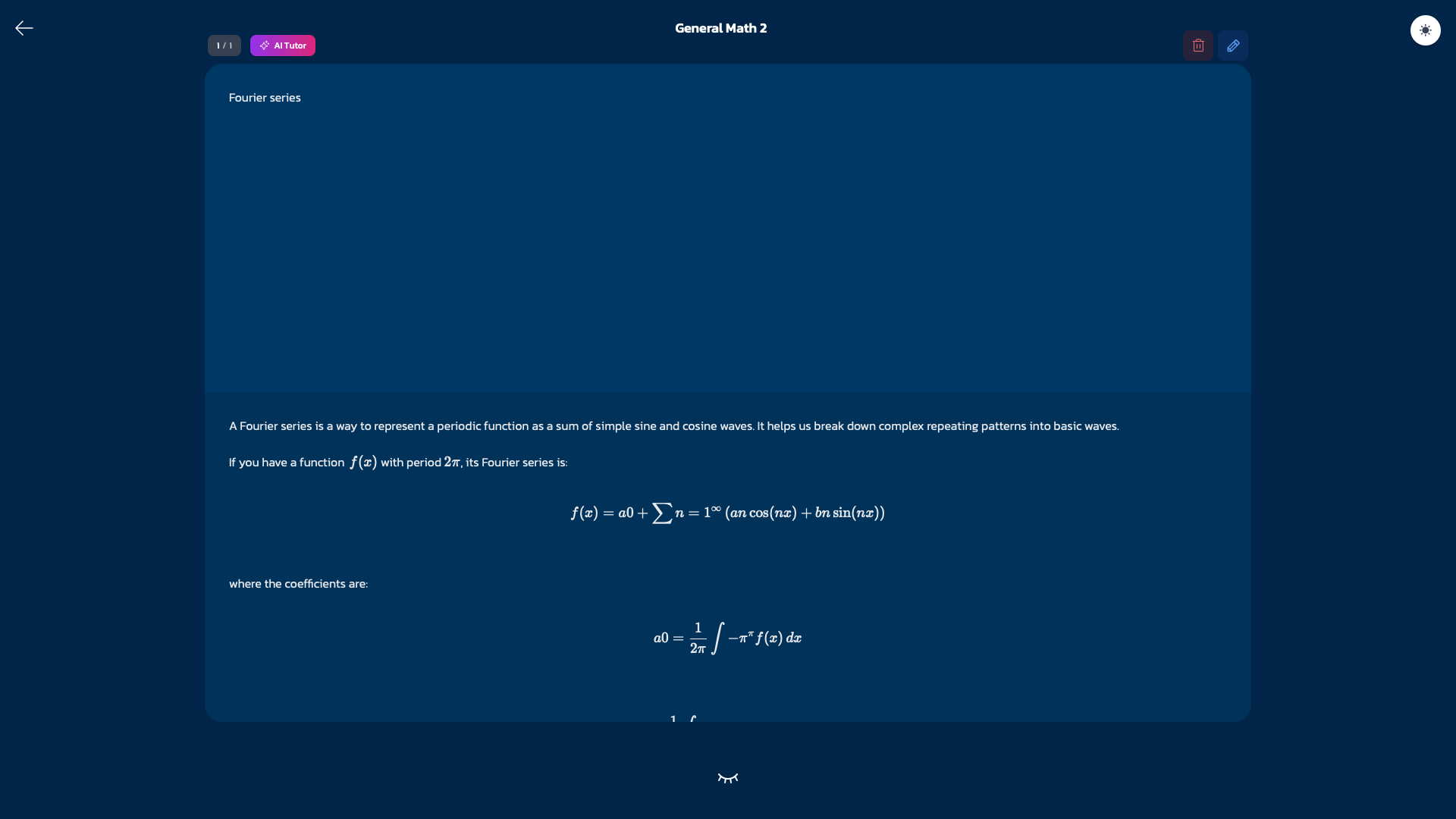
Here's what a typical workflow looks like. Say you need to memorize the quadratic formula for an exam. You open a new card, tap the LaTeX editor, and either type `\frac{-b \pm \sqrt{b^2 - 4ac}}{2a}` directly or ask the AI to generate it. The formula renders cleanly on the card front, and you type the concept name or a question on the back. Done. No copy-pasting images, no fighting with formatting.
The app also has over 450,000 pre-made flashcards across subjects like math, physics, chemistry, and biology — many of which already include properly formatted formulas. For students who don't want to build every deck from scratch, these pre-built options save real time.
A few practical details worth mentioning. Mindomax supports LaTeX rendering across all platforms — web , iOS, and Android. The built-in spaced repetition system uses a 15-card active queue that auto-schedules mastered and missed cards at different intervals. The AI assistant allows 90 requests per day on Premium ($5 per month) and 3 per day on the free plan. And for STEM students working across disciplines, the app supports pronunciation in 14 languages — useful if you're combining language study with technical coursework.
Quick LaTeX Reference for Flashcard Studying
Whether you use Mindomax or another flashcard app LaTeX tool, knowing a few basic commands makes creating math cards much faster. Here are the most common ones STEM students need.
For fractions, type `\frac{numerator}{denominator}`. For integrals, `\int_{a}^{b}` gives you a definite integral from a to b. Summations work the same way: `\sum_{i=1}^{n}` produces the sigma notation. Greek letters are just backslash plus the name — `\alpha`, `\beta`, `\theta`, `\sigma`, `\pi`. Subscripts use underscore (`x_{i}`) and superscripts use caret (`x^{2}`).
For matrices, wrap your content in `\begin{bmatrix}...\end{bmatrix}` where `&` separates columns and `\\` separates rows. Square roots are `\sqrt{x}` for regular and `\sqrt[n]{x}` for nth roots. Limits use `\lim_{x \to \infty}` and partial derivatives use `\frac{\partial}{\partial x}`.
That's roughly 80% of what most undergraduate STEM students need for flashcard creation. The remaining 20% — things like set notation (`\in`, `\subset`, `\mathbb{R}`), logic symbols (`\forall`, `\exists`, `\implies`), and specialized operators — can be looked up as needed from references like the LaTeX cheatsheet at QuickRef.
The real advantage of knowing even basic LaTeX is speed. Once you can type `\frac{d}{dx}[x^n] = nx^{n-1}` from memory, creating formula flashcards becomes almost as fast as typing regular text. And in a flashcard app LaTeX editor with live preview, you see the rendered result immediately — no compiling, no waiting.

CONCLUSION
The gap between how STEM students need to study and what most flashcard apps offer has been wide for years. LaTeX is the standard for mathematical notation in academia, but until recently, using it in flashcards meant either fighting with Anki's setup process or settling for plain text approximations. The research supports what common sense suggests — properly formatted formulas reduce unnecessary cognitive load, and combining them with spaced repetition and active recall creates one of the most effective study workflows available. Tools like Mindomax and other modern flashcard platforms are closing that gap by building LaTeX rendering directly into the flashcard experience, often with AI assistance that makes the process faster. For the millions of STEM students who need to memorize formulas, theorems, and equations every semester, a flashcard app LaTeX tool is no longer a luxury. It's a practical necessity.
Frequently Asked Questions
What is the best flashcard app for math equations?
The best choice depends on your needs. Anki offers the most mature LaTeX support but has a steep learning curve. Mindomax provides AI-assisted LaTeX editing with a modern interface. RemNote supports LaTeX cloze cards but limits free usage. Quizlet does not support LaTeX at all.
Do I need to know LaTeX to use it in flashcards?
Not necessarily. Some apps like Mindomax include AI assistants that generate LaTeX code from plain language descriptions. But learning basic commands like fractions, Greek letters, and integrals takes about 30 minutes and significantly speeds up flashcard creation for the rest of your academic career.
Does spaced repetition work for memorizing math formulas?
Yes. Research by Lyle et al. (2020) on engineering students showed that spaced retrieval practice was the only factor that improved long-term math retention across semesters. Voice and Stirton (2020) found similar results in university physics, with spaced learners scoring 9 percentage points higher on exams.
Can I use LaTeX flashcards on my phone?
It depends on the app. Mindomax renders LaTeX on iOS and Android and web. Anki supports MathJax on mobile but native LaTeX rendering requires desktop. Flashtex works only on Apple devices. Many other flashcard apps do not support LaTeX on mobile at all.
Why do math flashcards look wrong in most apps?
Most flashcard apps were designed for text-based subjects like languages and vocabulary. They lack LaTeX or MathJax rendering engines, so mathematical notation displays as raw code or unformatted plain text instead of properly typeset equations with fractions, integrals, and Greek symbols rendered correctly.


